
HP OmniStudio 23.8-Inch All-in-One Desktop Review: A Clean, Capable Home and Office PC
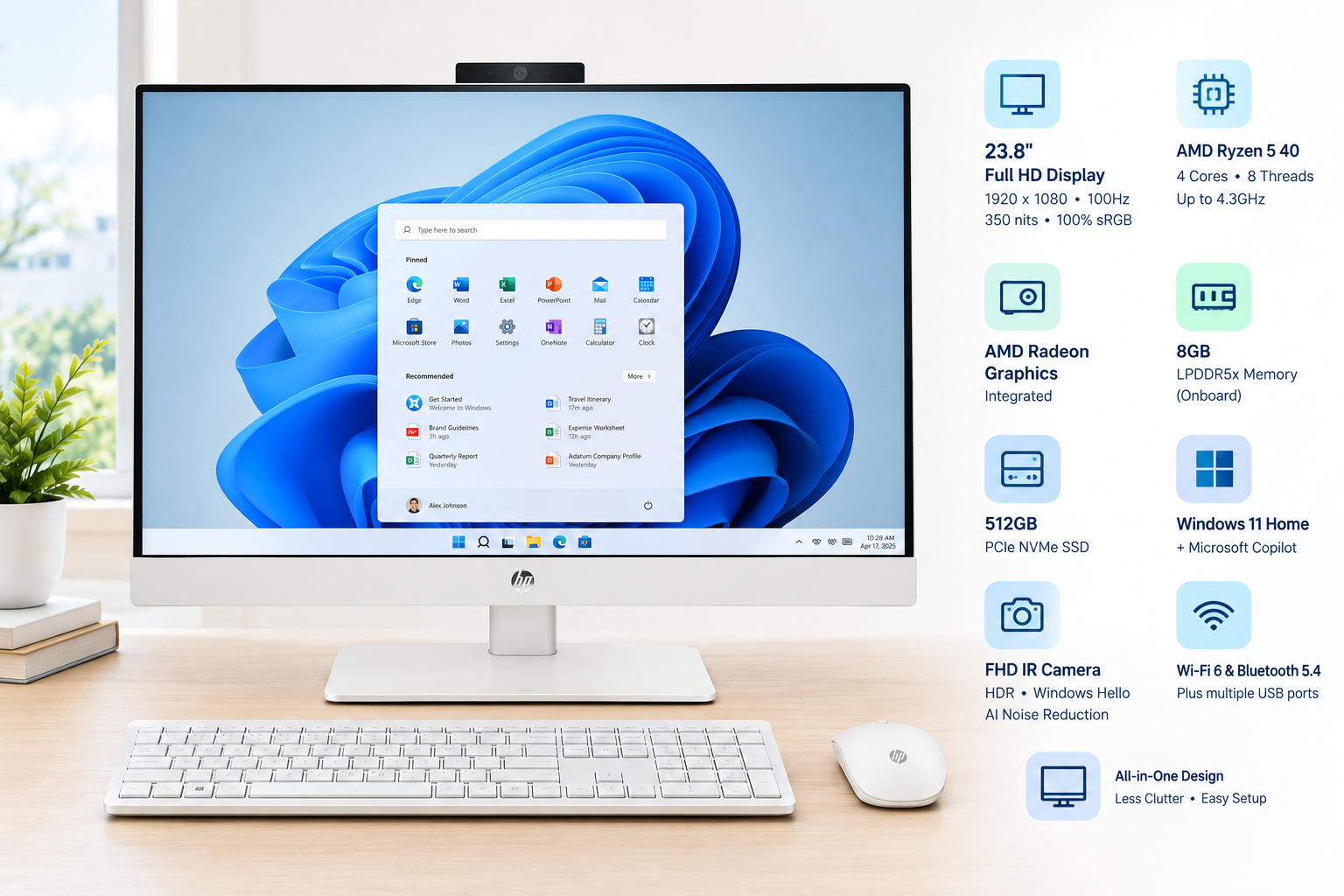
The HP OmniStudio 23.8-inch All-in-One Desktop combines a Full HD display, AMD Ryzen 5 40 processor, 8GB of LPDDR5x memory, 512GB PCIe NVMe SSD storage, integrated AMD Radeon graphics, and Windows 11 Home in a compact Cotton White design. Its 100Hz display, built-in FHD IR camera, Windows Hello support, wireless connectivity, and eye-comfort features make it well suited to home offices, schoolwork, streaming, video calls, and everyday productivity. The main limitation is the modest 8GB memory configuration, which may restrict heavier multitasking and demanding creative workloads.
Overview
The HP OmniStudio 23.8-inch All-in-One Desktop is designed for users who want a tidy desktop setup without the separate tower, monitor, webcam, and speakers typically required by a conventional PC. Its Cotton White chassis gives it a modern appearance, while the integrated design helps reduce cable clutter on a desk.
This configuration pairs an AMD Ryzen 5 40 processor with 8GB of LPDDR5x memory, a 512GB PCIe NVMe solid-state drive, integrated AMD Radeon graphics, and Windows 11 Home. It is positioned primarily as an everyday computer for productivity, communication, media consumption, light photo editing, and casual gaming rather than a workstation for highly demanding applications.
Standout Features
23.8-inch Full HD Display
The 23.8-inch display uses a 1920 x 1080 Full HD resolution, 100Hz refresh rate, 350 nits of brightness, and 100% sRGB coverage. These specifications should provide a clear workspace for documents and web browsing, while the faster refresh rate can make scrolling, window movement, and compatible video content appear smoother than on a standard 60Hz panel.
The display also includes an anti-glare surface and HP Eye Ease technology, which is intended to reduce blue-light exposure while retaining color quality. These features are useful for users who spend extended periods reading, working, or attending online meetings.
AMD Ryzen 5 40 Processor
The AMD Ryzen 5 40 processor is listed with four cores, eight threads, and boost speeds of up to 4.3GHz. This gives the system enough processing capacity for common desktop tasks such as office applications, browser-based work, streaming, video calls, and moderate multitasking.
Integrated AMD Radeon Graphics
Integrated AMD Radeon graphics handle display output, video playback, casual games, and basic photo-editing workloads without requiring a separate graphics card. This keeps the all-in-one design compact and energy-conscious, although users seeking high frame rates in modern, graphically intensive games will likely need a desktop with dedicated graphics.
Supporting Features
The 512GB PCIe NVMe M.2 SSD provides faster startup and application loading than a traditional hard drive. Its capacity is practical for documents, photos, applications, and a moderate media library, although users with extensive video collections or large game libraries may eventually need external storage.
The computer includes 8GB of LPDDR5x memory. This is adequate for everyday computing, but it leaves less headroom for heavy multitasking, large creative projects, virtual machines, or demanding browser workflows. Because the memory is an onboard configuration, buyers should consider their long-term workload before choosing this model.
Windows 11 Home provides the familiar Microsoft desktop environment, along with built-in productivity features and access to a broad range of software. The system also supports Microsoft Copilot features available through Windows 11.
For communication, the OmniStudio includes an FHD IR camera with HDR auto switching, integrated microphones, and AI-based noise reduction. The infrared camera supports Windows Hello facial recognition, allowing compatible users to sign in without typing a password every time.
Usability
The all-in-one format makes setup straightforward. Users only need to connect the power adapter and attach the included keyboard and mouse before beginning Windows 11 setup. Integrating the computer components behind the display keeps the workspace visually clean and makes the system suitable for bedrooms, study areas, reception desks, and compact home offices.
The 23.8-inch screen offers a useful balance between workspace and desk footprint. It is large enough for side-by-side documents and productivity windows without taking up the space of a larger monitor. The built-in webcam and speakers also eliminate the need for several common accessories.
Wireless connectivity is provided through Wi-Fi 6 and Bluetooth 5.4, while the system also includes wired connection options and multiple USB ports. Users should still check the exact port layout before purchasing if they plan to connect several high-speed peripherals, external displays, or specialized accessories.
Performance
For everyday work, the HP OmniStudio should feel responsive thanks to the Ryzen 5 processor and NVMe SSD. Tasks such as browsing with multiple tabs, editing documents, streaming video, managing email, and participating in video conferences should fit comfortably within its intended use case.
The integrated Radeon graphics are suitable for casual gaming and less demanding creative applications at sensible settings. They are not intended to replace a dedicated gaming GPU, so demanding modern games, advanced 3D rendering, and professional video production may expose the system's limits.
The 8GB memory configuration is the most important performance consideration. It can handle normal home and office workloads, but users who frequently keep many applications open or work with large files may benefit from a system configured with more memory. For general productivity and family use, however, the component balance is sensible and should provide a smooth experience.
Pros and Cons
Pros
- Compact all-in-one design reduces desk clutter
- 23.8-inch Full HD display with a smooth 100Hz refresh rate
- 100% sRGB coverage and 350 nits of brightness
- AMD Ryzen 5 40 processor with four cores and eight threads
- Fast 512GB PCIe NVMe SSD
- Integrated AMD Radeon graphics for everyday visuals and casual gaming
- FHD IR webcam with HDR and Windows Hello support
- AI noise reduction for clearer video calls
- Wi-Fi 6 and Bluetooth 5.4 connectivity
- Windows 11 Home included
Cons
- 8GB of memory may be limiting for demanding multitasking
- Integrated graphics are not ideal for modern high-end gaming
- All-in-one components can be less flexible to upgrade than a traditional desktop
- Full HD resolution is practical but less detailed than 1440p or 4K alternatives
- Built-in speakers and webcam are convenient but may not replace dedicated peripherals for professional use
Summary
The HP OmniStudio 23.8-inch All-in-One Desktop is a well-rounded choice for home users, students, families, and office workers who value a clean setup and simple installation. Its Ryzen 5 processor, NVMe SSD, smooth Full HD display, integrated webcam, and Windows 11 software provide a capable foundation for everyday computing.
Its main weakness is the 8GB memory configuration, which makes it better suited to general productivity than intensive creative or professional workloads. Buyers who prioritize convenience, integrated features, and an uncluttered workspace will find the OmniStudio appealing, while power users should consider a model with more memory and stronger graphics hardware.