
acer Gateway Chromebook 314 CBO314-1H-C476 Review: A Simple 14" Chromebook for Everyday Tasks
This review takes an in-depth look at the **[acer Gateway Chromebook 314 CBO314-1H-C476](https://www.amazon.com/dp/B0DVCBYMQY)**, a 14-inch Full HD Chromebook built around the Intel Celeron N4500 platform, 4GB of LPDDR4X RAM, and 64GB of eMMC storage. We examine its design, display, performance in web-based tasks, strengths as a basic work‑and‑study machine, and limitations for heavier multitasking, offline workloads, and media creation. The article highlights where this Chrome OS laptop fits best—light productivity, browsing, and classroom use—and outlines key trade-offs so potential buyers can decide if this model aligns with their needs.
Product Context
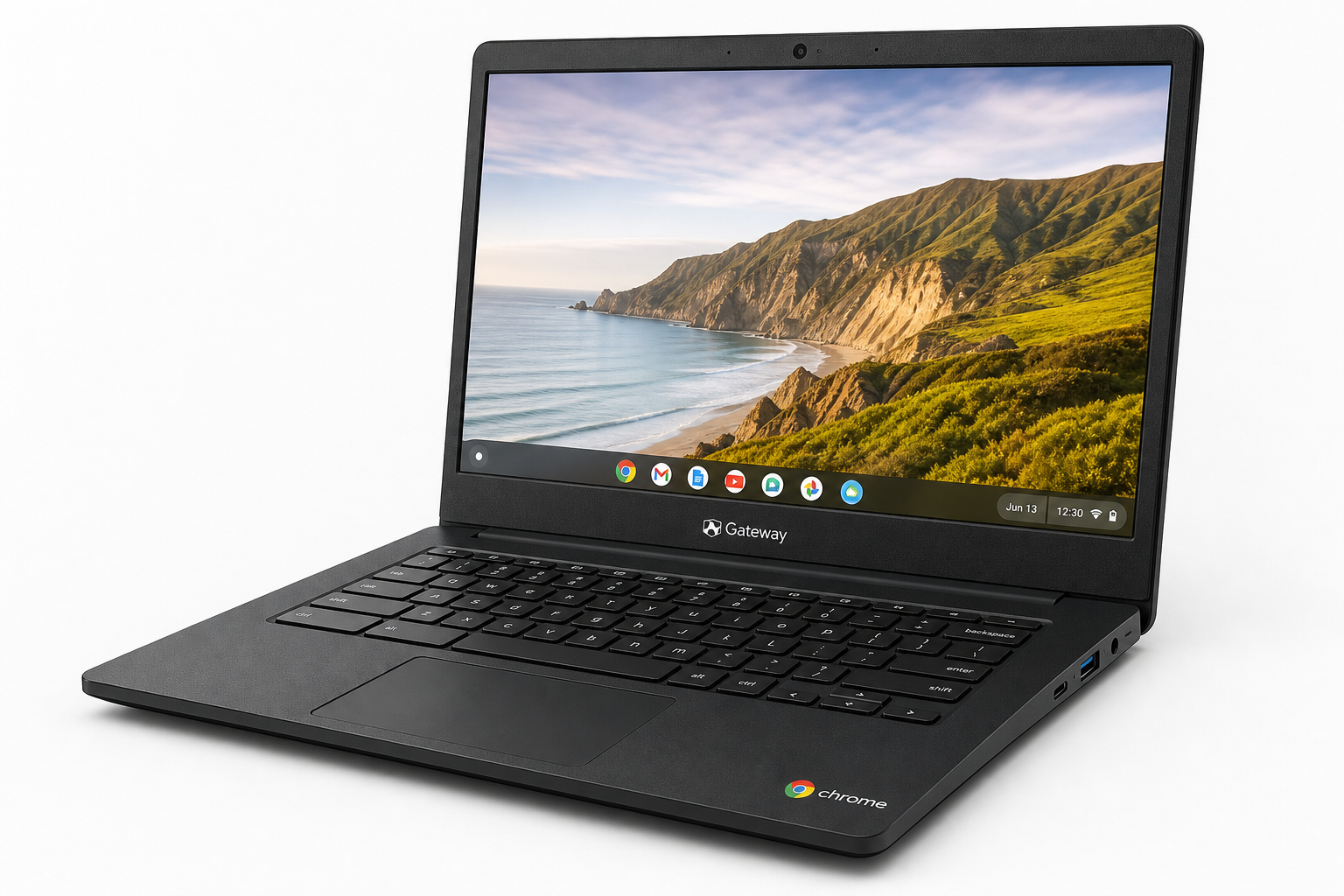
The acer Gateway Chromebook 314 CBO314-1H-C476 is a 14-inch Chrome OS laptop targeting students, casual users, and anyone who primarily lives in a web browser. With an Intel Celeron N4500 processor, 4GB of LPDDR4X memory, and 64GB of eMMC storage, it’s clearly positioned as an entry-level Chromebook for everyday tasks like web browsing, email, video calls, and using web apps such as Google Workspace.
Key specs at a glance:
- CPU: Intel Celeron N4500 (dual-core)
- Display: 14" Full HD (1920 x 1080)
- Memory: 4GB LPDDR4X
- Storage: 64GB eMMC
- Wireless: Wi‑Fi 5 (802.11ac)
- OS: Chrome OS
- Color: Star Black
The proposition here isn’t raw performance. Instead, it’s a straightforward, no-frills Chromebook with a sharper Full HD panel than many low-cost competitors, and enough power for basic cloud-centric workflows.
Feature Breakdown
14" Full HD Display
A standout feature in this class is the 14-inch Full HD (1920 x 1080) display. Many budget Chromebooks settle for 1366 x 768 resolution, which can feel cramped and grainy. Full HD brings:
- Sharper text and UI elements, which is helpful for reading, documents, and long study sessions.
- More usable screen real estate, allowing two apps or browser windows side-by-side more comfortably.
The panel type in this family is typically TN or basic LCD on budget configurations, so you should expect serviceable but not premium color accuracy and viewing angles. It’s suitable for everyday tasks and streaming, but not ideal for color-critical work or rich media editing.
Intel Celeron N4500 Processor
The Intel Celeron N4500 is a low-power, dual-core CPU designed for lightweight laptops and Chromebooks. In the context of Chrome OS, that means:
- Comfortable performance for single or few-tab browsing, Google Docs, Sheets, Slides, and email.
- Acceptable responsiveness for basic Android apps from the Play Store, especially productivity or reading apps.
Where it starts to struggle is with:
- Heavy multitasking, such as dozens of Chrome tabs or running multiple web apps simultaneously.
- Demanding Linux apps or more advanced development workflows.
4GB LPDDR4X RAM
With 4GB of LPDDR4X memory, the Gateway Chromebook 314 sits at the lower end of current Chromebook configurations. In practical terms:
- It can handle light multitasking: a handful of tabs, a video stream, and a couple of web apps.
- Power users who habitually keep many tabs open or use complex web tools may experience slowdowns or tab reloads.
For basic use, 4GB is still workable on Chrome OS, but if you anticipate intensive multitasking, this is an important limitation to keep in mind.
64GB eMMC Storage
The 64GB eMMC storage is typical of budget Chromebooks. It’s:
- Sufficient for Chrome OS, core apps, and locally stored documents.
- Not ideal if you plan to install many Android apps, offline media, or Linux applications.
Chrome OS is designed with cloud storage in mind, so this model is best when paired with Google Drive or similar cloud services, plus occasional use of external storage (USB or microSD, depending on ports available on the specific configuration).
Connectivity and Wireless
The presence of Wi‑Fi 5 (802.11ac) offers solid wireless performance for most home, school, and coffee-shop networks. For a machine focused on web-based workflows, stable Wi‑Fi is critical, and Wi‑Fi 5 remains adequate for HD streaming and online collaboration.
Port configuration varies slightly across sub-models in the 314 line, but Gateway-branded 314 Chromebooks typically include a mix of USB‑C, USB‑A, audio jack, and sometimes microSD. This supports basic peripherals, external storage, and wired connections without needing many adapters.
Chrome OS and Software Ecosystem
Running Chrome OS, the Gateway Chromebook 314 benefits from:
- Streamlined setup: sign in with a Google account and sync your bookmarks, extensions, and settings.
- Built-in security with verified boot, automatic system updates, and sandboxed apps.
- Access to web apps, Android apps (via Google Play Store), and optional Linux (Beta) for more technical users.
Chrome OS is best suited to people already using Google’s ecosystem—Gmail, Google Docs, Drive, Classroom, Meet, and so on.
Performance Insights
Everyday Web and Productivity
For day-to-day productivity, the Celeron N4500 + 4GB RAM combination is tuned to light workloads:
- Web browsing with a moderate number of tabs is generally smooth.
- Web-based productivity (Google Docs/Sheets/Slides, calendar, email) performs well when not overloaded with simultaneous tasks.
- Video conferencing, such as Google Meet or Zoom, is workable, particularly if you limit background tabs and apps.
Performance will degrade if you:
- Keep many tabs open for long periods.
- Run complex web apps (e.g., heavy project-management tools, complex dashboards) alongside video streaming.
Media Consumption
The Full HD display is a plus for streaming video. Combined with the integrated Intel UHD graphics, the Chromebook handles:
- 1080p video playback in the browser or supported apps.
- Streaming platforms like YouTube, Netflix, and similar services.
Audio quality on budget Chromebooks tends to be functional but basic. Expect speakers suitable for online classes, calls, and casual listening, though many users will prefer headphones for richer sound.
Multitasking and Advanced Use
While Chrome OS is efficient, this hardware configuration is clearly aimed at basic parallel workloads. You can:
- Run a document editor, chat app, and a few reference tabs without issues.
- Use simple Android productivity apps in tandem with browser tasks.
However, it’s not designed for:
- Heavy-duty Linux applications, containerized development tools, or full-fat IDEs.
- Demanding creative work like video editing or complex photo manipulation.
The performance profile makes the acer Gateway Chromebook 314 particularly suitable for students, casual users, and secondary devices rather than for professional power users.
Usability
Design and Build
The Star Black finish gives the Chromebook 314 a low-key, professional look. Build quality in this class typically emphasizes lightweight practicality over premium materials:
- The chassis is usually plastic but reasonably sturdy for everyday use.
- It’s portable enough for commuting, campus use, or moving around the house.
This design is ideal for classroom carts, shared home devices, and basic office environments where durability and simplicity matter more than ultra-thin or metal construction.
Keyboard and Trackpad
Chromebooks in the 314 family generally feature:
- A full-size, island-style keyboard suitable for typing essays, emails, and reports.
- A responsive touchpad that supports Chrome OS gestures.
Key travel and feedback are typically comfortable enough for extended use, although you shouldn’t expect premium mechanical-feel typing. For students or office workers typing multiple hours a day, it should be adequate.
Battery Life Expectations
The Celeron N4500 is a low-power processor, and Chrome OS is optimized for efficiency, so you can generally expect all-day battery potential in light-to-moderate use (web browsing, documents, streaming, and emails at medium brightness). Exact endurance varies with workloads and brightness levels, but for typical school or office schedules, the Gateway Chromebook 314 is designed to last through most of a day without needing a charge.
Setup and Management
For individuals:
- Setup is as simple as signing in with a Google account, synchronizing bookmarks, extensions, and files from the cloud.
- Maintenance is minimal thanks to automatic updates and integrated malware resistance.
For schools or organizations:
- When paired with a Chrome Education or Enterprise license, Chromebooks in this class can be centrally enrolled, managed, and locked down, making the Gateway Chromebook 314 a viable option for managed fleets in education or small businesses.
Trade-offs
The acer Gateway Chromebook 314 CBO314-1H-C476 delivers a balanced set of features for its role, but there are clear trade-offs to consider.
Strengths
- Full HD 14" display at this level improves readability and workspace over lower-resolution competitors.
- Chrome OS simplicity and security are ideal for users who want minimal maintenance.
- Wi‑Fi 5 connectivity supports stable online learning and remote work.
- Lightweight, portable design fits student backpacks and office commutes.
Limitations
- 4GB RAM constrains heavy multitasking and advanced workflows; power users may prefer 8GB.
- 64GB eMMC storage encourages a cloud-first approach; users who store many large files locally will need external or cloud storage.
- The Celeron N4500 is tuned for light productivity, not intensive computing, gaming, or creative workloads.
- Display and audio, while adequate, are not tuned for professional media creation or audiophile use.
Who It’s Best For
The Chromebook 314 CBO314-1H-C476 is best suited to:
- Students who primarily use Google Classroom, Docs, Slides, and browser-based tools.
- Home users needing a simple device for web browsing, email, video calls, and streaming.
- Organizations and schools looking for manageable, affordable Chrome OS devices for basic productivity and assessments.
It’s less well-suited for:
- Users who routinely work with hundreds of browser tabs, multiple VMs, or complex web tools.
- Professionals requiring specialized Windows or macOS-only software.
- Content creators running resource-intensive editing tools or local production workflows.
Conclusion
The acer Gateway Chromebook 314 CBO314-1H-C476 is a practical, entry-level Chromebook built around a clear use case: reliable, straightforward computing for web-centric tasks. Its 14-inch Full HD display, Celeron N4500 processor, 4GB of RAM, and 64GB of eMMC storage are well-matched for light productivity, remote learning, and everyday browsing in Chrome OS.
It doesn’t aim to compete with high-end laptops or developer-focused machines. Instead, it targets users who value simplicity, portability, and the security of Chrome OS. If your daily routine revolves around the browser, Google Workspace, and cloud services—and you understand the inherent limits of entry-level hardware—the Gateway Chromebook 314 is a sensible option to consider.
Before purchasing, think carefully about your multitasking and storage needs. If you plan to stay within light-to-moderate workloads and lean on cloud storage, this Chromebook can be an efficient, low-maintenance companion for school, home, or basic office tasks.