
Apple 2026 MacBook Air 15-inch (M5) Review: A Bigger, AI‑Ready Air for Everyday Power Users
This review examines the **[Apple 2026 MacBook Air 15-inch Laptop with M5 chip](https://www.amazon.com/dp/B0GR114BV7)**, a 15.3-inch ultraportable notebook positioned as a thin-and-light workhorse with AI-focused capabilities. Equipped with Apple’s M5 chip, 16GB of unified memory, a 512GB SSD, a 15.3-inch Liquid Retina display, 12MP Center Stage camera, Touch ID, and Wi‑Fi 7, it targets students, mobile professionals, and creators who want more screen real estate than the 13-inch Air without jumping to the MacBook Pro line. The article covers typical use cases, performance in productivity, creative, entertainment, and AI-assisted workflows, as well as strengths, limitations, and an overall verdict on who will benefit most from this configuration.
Introduction
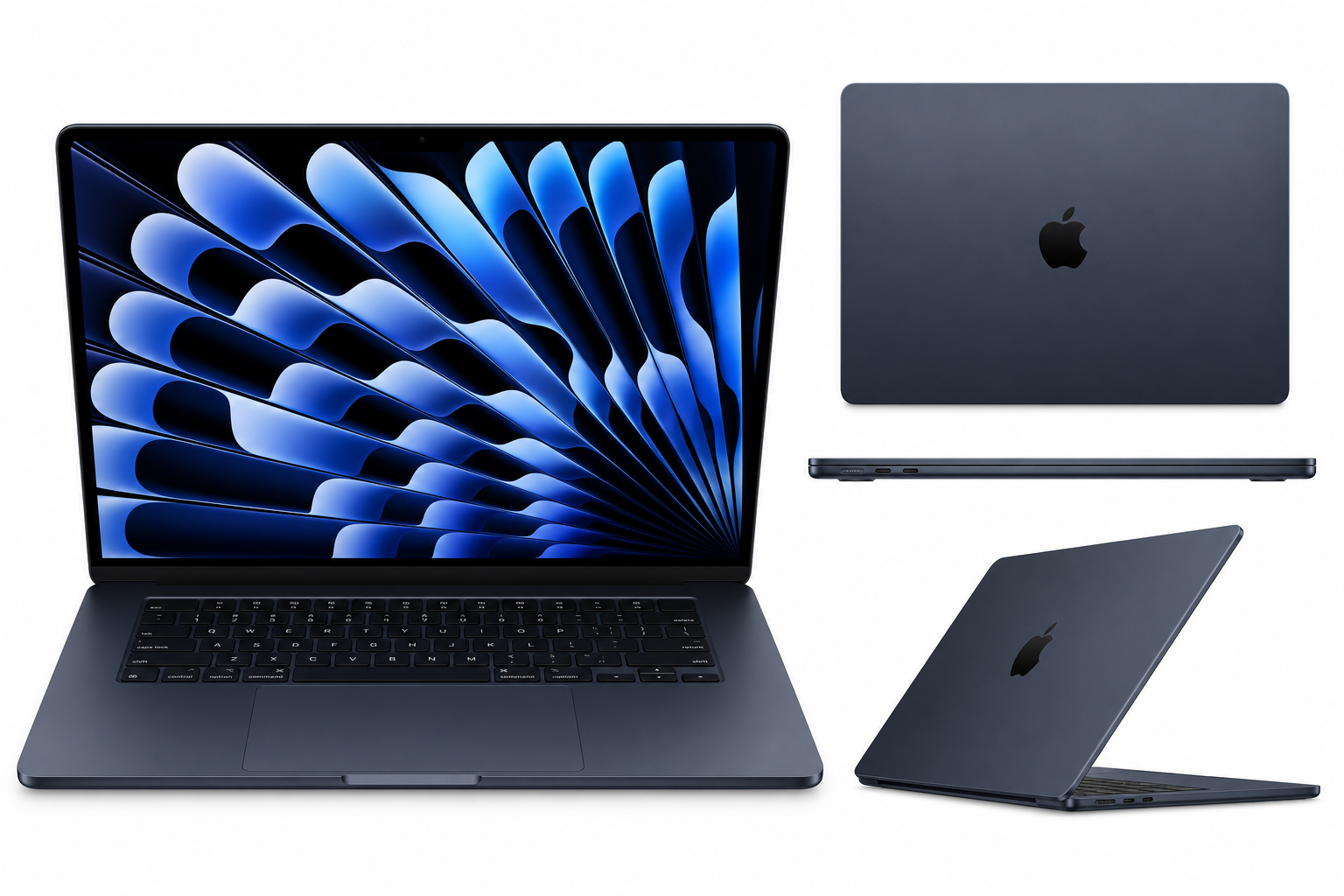
The Apple 2026 MacBook Air 15-inch Laptop with M5 chip: Built for AI, 15.3-inch Liquid Retina Display, 16GB Unified Memory, 512GB SSD, 12MP Center Stage Camera, Touch ID, Wi-Fi 7; Midnight extends the MacBook Air family into a roomier 15.3-inch form factor while retaining the line’s defining traits: a thin and light chassis, fanless design, and strong efficiency.
This 2026 iteration centers on Apple’s M5 chip, marketed as “built for AI,” paired with 16GB of unified memory and 512GB of solid-state storage. A 15.3-inch Liquid Retina display, upgraded 12MP camera with Center Stage, Touch ID, and Wi‑Fi 7 round out the package. The result is a machine aimed at users who want a large, color-accurate display and enough headroom for modern AI‑enhanced workloads, but without the weight, thermals, or cost profile of a MacBook Pro.
In this review, we’ll look at where this configuration excels, where it feels constrained, and which user profiles are most likely to find it a compelling choice.
Typical Use Cases
1. University and Professional Students
For students in fields like computer science, business, design, and media, the 15.3-inch MacBook Air balances portability with a workspace large enough for split-screen multitasking. Typical tasks include:
- Note-taking, research, and heavy use of web apps and productivity suites
- Video conferencing for remote lectures and group projects using the 12MP Center Stage camera
- Running AI‑assisted tools in writing, coding, and data analysis
- Light to moderate photo and video editing for coursework
The 16GB unified memory configuration is appropriate for students juggling multiple apps and dozens of browser tabs, especially when AI tools and background processes are involved.
2. Mobile Professionals and Knowledge Workers
Consultants, writers, analysts, marketers, and remote workers benefit from:
- A large but still portable 15.3-inch Liquid Retina display for spreadsheets, documents, and dashboards
- Reliable video calls with the upgraded camera and dual‑mic array
- Quick wake, silent operation, and Touch ID for secure, fast logins
- Wi‑Fi 7 for improved wireless stability and throughput in modern office or home setups
This configuration fits best for professionals whose workload is heavy on documents, presentations, conferencing, and web apps, with occasional creative or analytical tasks.
3. Content Creators and Hobbyist Editors
While the MacBook Pro line remains better suited for sustained, intensive creative workloads, this 15-inch Air can serve:
- Hobbyist and semi‑pro photo editing (Lightroom, Photoshop) on a color-accurate display
- Occasional 4K video editing, short-form content, and social media production
- Podcast planning and light audio work
The 16GB / 512GB combination offers a pragmatic floor for such workloads, but large project libraries may still call for fast external storage.
4. AI‑Assisted Workflows and Coding
The M5 chip is described as “built for AI,” indicating stronger on‑device acceleration for machine‑learning tasks compared with earlier generations. Relevant use cases include:
- Running on-device AI writing, summarization, and note‑organizing tools
- Code completion and refactoring assistants integrated into IDEs
- Local inference on smaller models for privacy‑sensitive work
- AI‑enhanced photo upscaling, noise reduction, and background removal
For developers, the 15.3-inch display allows comfortable side‑by‑side views of editor, terminal, and browser, while the unified memory helps keep containerized environments and simulators responsive.
5. Everyday Home and Entertainment Use
For households and general users, this MacBook Air works well as a primary family laptop:
- Streaming video and music on the large, high‑resolution display
- Casual gaming supported by the M5’s GPU and Metal‑optimized titles
- Photo management, personal finance, and general web browsing
- Occasional remote work and video calls
The slim profile and Midnight finish also make it suitable as a stylish shared device in a living room or home office.
Performance in Each Scenario
Productivity and Multitasking
The combination of the M5 chip and 16GB unified memory is tuned for everyday productivity with overhead for heavier sessions. Users can expect:
- Snappy app launches and smooth multitasking across office apps, browsers, and communication tools
- Comfortable handling of dozens of browser tabs plus productivity suites without noticeable slowdowns
- Efficient power draw that supports long sessions away from the charger
This positions the device as a highly capable daily driver for students and professionals who often work untethered.
Creative Workloads
For photo and light video editing, the 15.3-inch Liquid Retina display’s resolution and color quality allow accurate previews. The M5’s CPU/GPU combination accelerates:
- RAW photo adjustments, batch exports, and AI‑powered masking tools
- Timeline scrubbing and basic 4K video edits with transitions and color corrections
For longer, multi-track 4K edits or complex motion graphics, thermally heavier workloads may feel constrained by the thin, fanless chassis compared with a MacBook Pro. However, for social media content, short clips, and still photography, the Air remains highly usable.
AI‑Assisted and Developer Workflows
The “built for AI” positioning of the M5 chip implies improved neural engine capabilities, benefiting:
- On-device inference performance, reducing reliance on cloud latency and connectivity
- Real-time AI features in productivity apps (transcription, summarization, translation)
- Local developer workflows with AI‑powered debugging and refactoring tools
Developers running containers, local databases, or emulators will find 16GB unified memory a reasonable baseline. For multiple heavy containers or large local models, a higher-memory configuration would be preferable, but this spec hits a good middle ground.
Communication and Conferencing
The 12MP camera with Center Stage is a notable step up from older 720p and 1080p webcams. It:
- Keeps participants framed dynamically in the shot
- Delivers sharper, more detailed images for professional calls
Paired with dual microphones and the M5’s signal processing, speech clarity benefits from background noise reduction, making this machine well-suited to remote and hybrid work scenarios.
Wireless Connectivity and Portability
Wi‑Fi 7 support future‑proofs the device for multi‑gigabit networks and congested environments. Users on compatible routers can expect:
- Higher peak throughput for large downloads, cloud backups, and collaboration
- More stable performance in dense apartment buildings and offices
Despite the 15.3-inch display, the MacBook Air remains relatively light and thin, preserving its easy‑to‑carry character compared with many 15-inch Windows ultrabooks.
Strengths Across Scenarios
-
Large, High-Quality Display in an Ultraportable Body
The 15.3-inch Liquid Retina display offers more room for multitasking than the 13-inch Air without dramatically increasing weight. This benefits students, remote workers, and creators alike. -
M5 Performance and AI Focus
The M5 chip’s performance and efficiency, combined with enhanced neural processing, position this model well for AI‑infused apps that are rapidly becoming standard in productivity and creative suites. -
16GB Unified Memory as a Practical Baseline
16GB unified memory is an effective sweet spot for users who keep many apps and browser tabs open while using AI and creative tools. It substantially extends headroom over 8GB options. -
Fanless, Quiet Operation with Long Battery Life
The hallmark MacBook Air experience—cool, silent, and long‑lasting—remains intact even in the larger 15-inch form factor, suiting lecture halls, libraries, and quiet workspaces. -
Modern Connectivity and Camera
Wi‑Fi 7 and the 12MP Center Stage camera future‑proof video conferencing and wireless performance. This directly benefits anyone who relies on clear calls and fast cloud access. -
Secure and Convenient Authentication
Touch ID integrated into the keyboard offers quick unlocks and secure authorization for app installs and payments, simplifying daily use. -
Refined Design and Midnight Finish
The Midnight colorway gives the laptop a modern, understated look that appeals to both professional and personal use, while the overall industrial design remains premium and durable.
Limitations Across Scenarios
-
Not a Substitute for a High-End MacBook Pro
While the M5 is powerful, the MacBook Air’s thin, fanless design means it is not ideal for sustained, heavy workloads such as extended 4K multicam editing, 3D rendering, or large-scale scientific simulations. Those tasks benefit more from Pro-class thermals and higher-core GPUs. -
Memory and Storage Ceiling for Power Users
16GB unified memory and a 512GB SSD are adequate for many, but intensive developers or creative professionals may prefer configurations with more memory and storage to avoid reliance on external drives. -
Limited Upgradeability
As with other modern MacBooks, memory and storage are not user-upgradable. Buyers need to choose their configuration carefully at purchase time, based on anticipated future needs. -
Port Selection Considerations
Users heavily dependent on multiple external displays or a wide array of peripherals may find the typical MacBook Air port layout restrictive, requiring a dock or hub for complex setups. -
Midnight Finish and Smudges
The Midnight color is visually appealing but can show fingerprints and smudges more readily than lighter finishes, which may bother users who prefer a perpetually clean look.
Verdict
The Apple 2026 MacBook Air 15-inch Laptop with M5 chip is a compelling option for users who value a larger display, strong everyday performance, and modern AI capabilities in a truly portable machine. Its combination of the M5 chip, 16GB unified memory, 512GB SSD, 15.3-inch Liquid Retina display, 12MP Center Stage camera, Touch ID, and Wi‑Fi 7 makes it particularly well-suited to:
- University students and educators seeking a do‑everything notebook that can handle research, writing, conferencing, and creative coursework
- Mobile professionals who want a comfortable workspace on the go without stepping up to the weight and thermal profile of a MacBook Pro
- Enthusiast creators and hobbyists working in photography and light video who appreciate color accuracy and AI‑accelerated tools
Potential buyers whose workloads include sustained heavy rendering, complex 3D work, or very large AI models may still be better served by a MacBook Pro with more thermal headroom, memory, and GPU resources.
For the majority of students, hybrid workers, and everyday creators, however, this configuration strikes a thoughtful balance of size, capability, and forward‑looking AI support. If you want a bigger screen than the classic 13-inch Air while staying within the thin-and-light category, the 15.3-inch MacBook Air with M5 is a strong candidate—and the listing at Amazon is a good reference point for its full set of specifications and options.