
Apple iPad Air 11‑inch (M4) Review: A Powerful All‑Rounder for Work, Study, and Creativity
This review covers the Apple iPad Air 11‑inch (M4) with Liquid Retina display, 128GB storage, Wi‑Fi 7 with Apple N1, 12MP front and back cameras, Touch ID, and all‑day battery life. It examines typical use cases such as productivity, study, media consumption, and light creative work, and evaluates performance, strengths, and limitations across these scenarios. The article concludes with a verdict on who will benefit most from this Space Gray iPad Air configuration.
Introduction
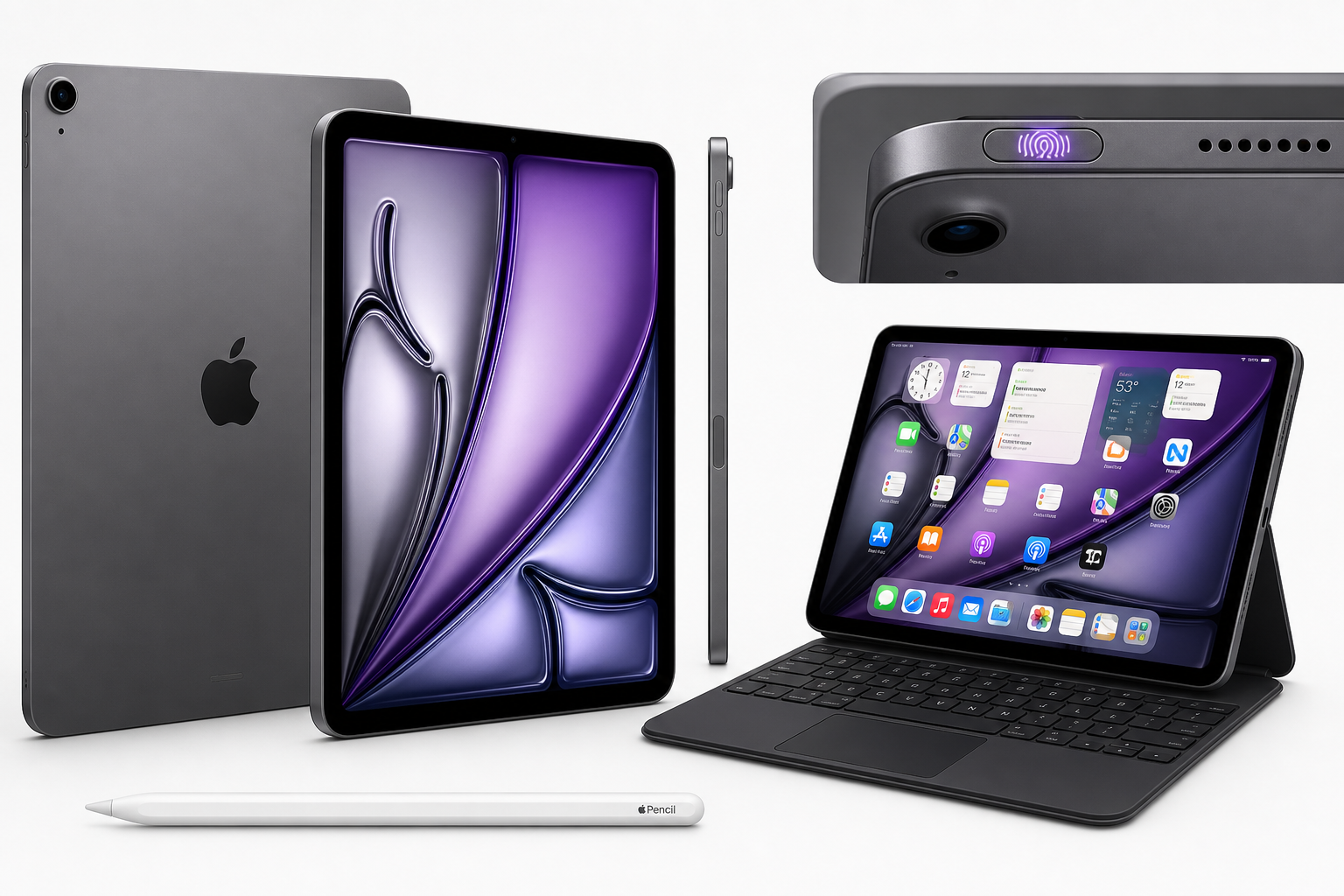
The Apple iPad Air 11-inch (M4) is Apple’s latest mid‑range tablet, positioned between the entry‑level iPad and the iPad Pro line. This model combines an 11‑inch Liquid Retina display, Apple’s M4 chip, 128GB of storage, Wi‑Fi 7 with the Apple N1 wireless architecture, 12MP front and rear cameras, Touch ID, and an all‑day battery claim into a single, slim Space Gray package.
In this review, we look at how this iPad Air performs in everyday productivity, study, entertainment, and creative scenarios, and where it sits in Apple’s lineup for different types of users.
You can view the full product details directly on Amazon here: Apple iPad Air 11-inch (M4): Liquid Retina Display, 128GB, 12MP Front/Back Camera, Wi-Fi 7 with Apple N1, Touch ID, All-Day Battery Life — Space Gray.
Typical Use Cases
1. Everyday Productivity and Work
For many users, the iPad Air 11‑inch (M4) will serve as a light laptop replacement. Common use cases include:
- Email, messaging, and video calls
- Web browsing and research
- Note‑taking during meetings or lectures
- Document editing and light spreadsheet work
- Remote collaboration via apps like Slack, Teams, or Zoom
Paired with an external keyboard and a trackpad‑equipped accessory, the iPad Air becomes a compact workstation that travels easily but still has enough power for demanding workflows.
2. Study and Learning
Students and lifelong learners can use this iPad Air for:
- Digital note‑taking with Apple Pencil (sold separately)
- Annotating PDFs and textbooks
- Accessing online courses and virtual classrooms
- Managing assignments and calendars
The 11‑inch form factor hits a balance between screen real estate and portability, making it suitable for campus use or commuting.
3. Media Consumption and Casual Use
As a media device, the iPad Air 11‑inch (M4) targets:
- Streaming movies and series
- Casual gaming
- Reading books, comics, and news
- Social media and photo browsing
The Liquid Retina panel and solid speakers make it a good choice for entertainment in bed, on the couch, or on the go.
4. Creative Work and Light Content Production
Thanks to the M4 chip and capable 12MP front and rear cameras, this iPad Air is also appropriate for:
- Photo editing and light video editing
- Sketching, illustration, and graphic design
- Recording and cutting short social videos or vlogs
- Audio recording and podcast prep
While high‑end video professionals may still prefer an iPad Pro or a Mac, this device offers enough headroom for most hobbyists and semi‑professional creatives.
Performance in Each Scenario
Everyday Productivity and Work
The Apple M4 chip is designed to handle multitasking in iPadOS smoothly. In practical terms:
- App launching and switching are snappy, with typical productivity apps opening almost instantly.
- Split View and Slide Over multitasking remain fluid even with several apps active.
- Web apps and cloud tools feel responsive, which is essential when your workflow lives in the browser.
Wi‑Fi 7 support with the Apple N1 wireless architecture helps the iPad maintain high, stable throughput on compatible routers, improving cloud file sync, video calls, and large downloads.
Study and Learning
For study use, performance is more about reliability than raw speed, and this iPad Air meets that expectation:
- Note‑taking and handwriting apps run with low latency, especially when combined with Apple Pencil.
- PDF annotation and textbook viewing are comfortable on the 11‑inch display, with smooth zooming and page turning.
- Online lectures and virtual classes stream reliably over Wi‑Fi 7, and the 12MP front camera helps you appear clear in video sessions.
Battery endurance is sufficient to cover a full day of classes or study sessions when used primarily for note‑taking, reading, and intermittent streaming.
Media Consumption and Casual Use
The Liquid Retina display is designed to deliver:
- Sharp text and UI elements for comfortable reading
- Vivid colors for photos and video content
- Wide viewing angles, helpful when sharing the screen with others
Combined with efficient speakers and the M4’s graphics capabilities, this results in:
- Smooth playback of high‑resolution streams
- Comfortable casual gaming, including titles with more demanding graphics
- A responsive overall experience even when switching rapidly between apps
Creative Work and Content Production
In light creative workloads, the iPad Air 11‑inch (M4):
- Handles multi‑layer image editing and vector illustration with ease.
- Supports video editing of short clips, social content, and simple multi‑track timelines without obvious slowdowns.
- Offers low‑latency input for drawing and handwriting, which is critical for sketching and illustration.
The 12MP rear camera is capable of capturing sharp stills and detailed video, suitable for reference photography, scanning documents, or recording content. The 12MP front camera helps with on‑device vlogging and video conferencing, keeping you clear and centered.
Storage at 128GB is adequate for many people who primarily stream content and store documents in the cloud, but heavy media creators who keep large video libraries or many large projects locally may need to manage space more actively.
Strengths Across Scenarios
-
Balanced Performance with M4
The M4 chip delivers a noticeable performance margin for multitasking, creative apps, and games, making the device feel fast in nearly all typical scenarios. -
High‑Quality 11‑Inch Liquid Retina Display
The 11‑inch display balances portability with workspace. It offers crisp text, vivid colors, and strong viewing angles, suitable for both productivity and entertainment. -
Modern Connectivity with Wi‑Fi 7 and Apple N1
Support for Wi‑Fi 7 helps future‑proof your purchase and takes advantage of newer routers for improved speeds and stability, especially when streaming or transferring large files. -
Versatile 12MP Front and Rear Cameras
Both cameras provide quality imaging for video calls, scanning, reference photos, and casual content creation, surpassing what many laptops offer. -
All‑Day Battery Life Claim
In mixed use—web browsing, email, reading, and media streaming—the iPad Air is designed to last through a typical day without needing a charge. -
Portability and Build Quality
The slim, light chassis remains easy to carry in a backpack or briefcase. Space Gray styling keeps the look understated and professional. -
Touch ID for Quick, Familiar Unlocking
Touch ID in the top button offers convenient, reliable biometric authentication for unlocking, purchases, and app access. -
Strong App Ecosystem
Access to iPad‑optimized apps for productivity, creativity, education, and entertainment significantly expands what this hardware can do.
Limitations Across Scenarios
-
128GB Storage May Be Limiting for Heavy Creators
While 128GB is fine for general users, students, and office‑centric workflows, users working with multiple large video projects, 3D assets, or extensive local media libraries may quickly approach the limit and need to offload content or rely heavily on cloud storage. -
Accessories Sold Separately
To fully leverage the iPad Air for productivity or creative work, a keyboard case and Apple Pencil are highly recommended—but must be purchased separately, increasing total setup cost. -
No Face ID
Users accustomed to Face ID on other Apple devices may miss its convenience. Touch ID works well but requires a deliberate press. -
Not the Absolute Top‑End Display
While the Liquid Retina panel is excellent for most users, professionals who demand the highest‑end display technologies available in Apple’s lineup may still prefer an iPad Pro. -
Software Multitasking Still Tablet‑Centric
iPadOS has strong multitasking compared with many tablets, but users expecting a full desktop‑class windowing system may still find limitations compared with macOS or Windows.
Verdict
The Apple iPad Air 11-inch (M4) is a well‑rounded tablet that provides substantial performance, a high‑quality 11‑inch Liquid Retina display, up‑to‑date wireless connectivity with Wi‑Fi 7 and Apple N1, and capable 12MP cameras, all in a thin Space Gray chassis.
It is an excellent fit if you:
- Want a powerful, portable device for work, study, and media
- Plan to do light to moderate creative work such as photo editing, drawing, or short‑form video
- Prefer the combination of Touch ID, strong app support, and long battery life in a mid‑range Apple tablet
You may want to consider a different configuration or device if you are a heavy video professional, require more than 128GB of local storage, or need the absolute best display and features from the iPad Pro line.
For most users, however, this 11‑inch iPad Air with the M4 chip stands out as a compelling, balanced choice that should remain capable and responsive for years of everyday use.