
Apple iPad Air 13‑inch (M4) Review: Big-Screen Power in a Slim, Portable Package
This review of the [Apple iPad Air 13‑inch (M4)](https://www.amazon.com/dp/B0GQVBT32P) examines its larger Liquid Retina display, M4 chip performance, 256GB storage configuration, 12MP front and rear cameras, Wi‑Fi 7 connectivity with Apple N1, Touch ID, and all‑day battery life. It evaluates how the device balances portability and screen real estate, its suitability for productivity and creative work, the quality of its display and cameras, real‑world usage experience, and where it fits between the standard iPad and iPad Pro lines. Strengths, weaknesses, ideal use cases, and an overall recommendation are outlined to help buyers decide if this 13‑inch iPad Air is the right choice for their needs.
Overview
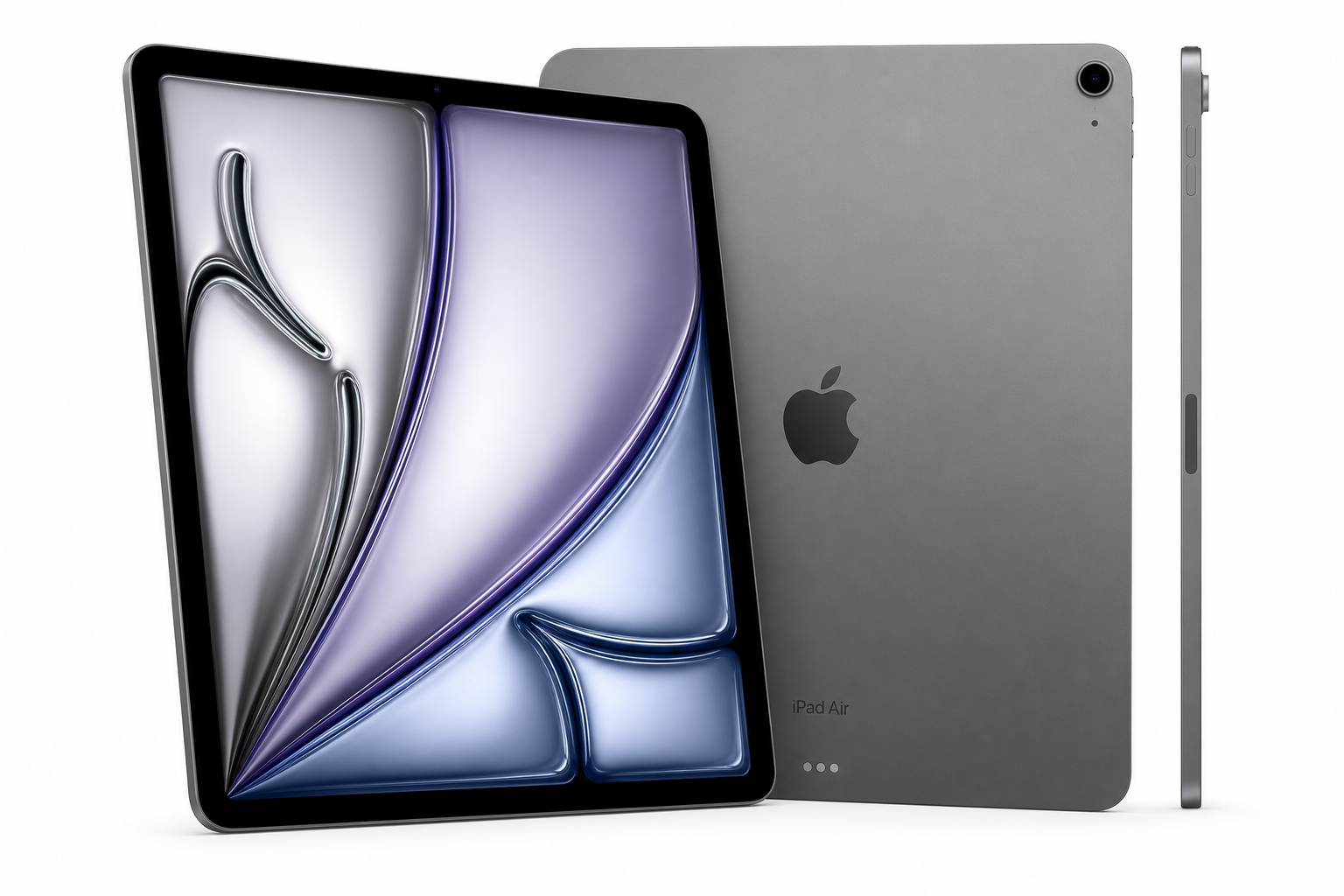
The Apple iPad Air 13‑inch (M4): Liquid Retina Display, 256GB, 12MP Front/Back Camera, Wi‑Fi 7 with Apple N1, Touch ID, All‑Day Battery Life — Space Gray extends the Air lineup into a true large‑screen form factor. With a 13‑inch Liquid Retina display and Apple’s M4 chip, it aims to provide near‑Pro‑level performance in a lighter, more affordable chassis, targeting students, professionals, and creators who want more screen real estate without jumping all the way to an iPad Pro.
This model pairs a 256GB storage configuration with updated wireless connectivity (including Wi‑Fi 7 and Apple’s N1 chip), a familiar Touch ID top button, and 12MP cameras on both the front and rear. It is positioned as a versatile do‑everything tablet for productivity, entertainment, and light creative workloads.
Key Highlights
- 13‑inch Liquid Retina display for a larger canvas while remaining thin and portable
- Apple M4 chip delivering substantial CPU and GPU performance gains over prior Air generations
- 256GB internal storage, a practical middle ground for apps, media, and documents
- 12MP front camera optimized for video calls, plus 12MP rear camera for scans and casual photos
- Wi‑Fi 7 with Apple N1 for faster, more reliable wireless networking and improved efficiency
- Touch ID integrated into the top button instead of Face ID
- All‑day battery life aimed at lasting a full work or school day on a single charge
- Space Gray finish for a classic, understated look
Core Features
Design and Build
The 13‑inch iPad Air follows Apple’s modern flat‑edged design language. Despite the larger display, the device remains relatively lightweight and thin, making it comfortable to hold for extended reading or note‑taking sessions. The Space Gray finish is subdued and professional, appealing to business users and students alike.
Slim bezels around the screen keep the footprint in check, while still leaving enough room for comfortable tablet handling. The aluminum unibody construction feels rigid, with minimal flex, and the usual Apple attention to fit and finish is evident in the precise machining and button feel.
13‑inch Liquid Retina Display
The defining characteristic of this model is its 13‑inch Liquid Retina display. The IPS panel offers sharp detail and wide viewing angles, with accurate colors suited to web content, productivity apps, and general media consumption.
The extra screen real estate over smaller iPads notably improves:
- Split‑screen multitasking and Stage Manager layouts
- On‑screen keyboard comfort when typing without accessories
- Room for UI controls in creative apps (drawing, photo editing, music production)
- Reading and annotating documents, PDFs, and textbooks
While it does not target the same extreme brightness and refresh characteristics as the iPad Pro line, the display quality is more than sufficient for most users, especially for productivity and casual creative work.
Apple M4 Chip
Powered by the Apple M4 SoC, this iPad Air is designed to deliver a significant performance uplift compared with earlier A‑series iPad Air models. The M‑series architecture brings desktop‑class CPU and GPU capabilities, which translates into:
- Smooth navigation through iPadOS, multitasking, and app switching
- Snappy performance in productivity apps such as office suites, email, and note‑taking
- Comfortable handling of large documents, multi‑layer graphics, and complex spreadsheets
- Capability for light to moderate video editing, photo editing, and music production
- Improved machine‑learning performance for on‑device AI features in supported apps
In practice, the M4 chip positions this iPad Air as more than adequate for the majority of users, with performance headroom that should remain usable and responsive for several operating system generations.
Storage: 256GB
The 256GB configuration strikes a balance between entry‑level storage and professional‑grade capacities. It is well‑suited for:
- Installing a broad mix of productivity, creativity, and entertainment apps
- Maintaining local offline copies of documents, lecture notes, and classroom materials
- Caching streaming media and storing a reasonable library of downloaded content
- Handling project files for light creative and professional work
Users dealing with extensive 4K video libraries, massive RAW photo archives, or heavy local datasets may still prefer higher capacities or external storage workflows, but 256GB will be sufficient for many mainstream scenarios.
Camera System: 12MP Front and Rear
This iPad Air includes a 12MP front camera and a 12MP rear camera, bringing parity with Apple’s current tablet imaging standards.
- Front camera: Optimized for video conferencing and online classes, it provides clear, detailed video for calls on platforms like Zoom, Teams, and FaceTime. Framing and quality are well‑suited for professional meetings and remote collaboration.
- Rear camera: While not a replacement for a dedicated smartphone camera, the 12MP rear sensor is more than adequate for scanning documents, capturing whiteboards, or taking quick reference photos for projects.
Combined with iPadOS’s built‑in camera and document‑scanning features, the imaging system aligns well with the tablet’s productivity focus.
Connectivity: Wi‑Fi 7 and Apple N1
Support for Wi‑Fi 7 with Apple N1 moves wireless performance forward. In compatible network environments, users can expect:
- Higher potential throughput for large downloads, cloud storage, and streaming
- Lower latency for responsive web apps, remote desktops, and cloud gaming services
- More reliable performance in congested environments, such as offices or dormitories
The internal networking architecture is also designed for efficiency, helping maintain strong performance without excessively impacting battery life.
Security and Authentication: Touch ID
Instead of Face ID, the iPad Air continues with Touch ID integrated into the top button. This approach offers:
- Quick, familiar fingerprint authentication for unlocking the device
- Secure authorization for app purchases and password auto‑fill
- Straightforward use even when the device is oriented in multiple positions
Some users may prefer Face ID for truly hands‑free unlocking, but Touch ID remains reliable, particularly in shared workspaces or environments where face coverings are common.
Battery Life
Apple positions this model with all‑day battery life, targeting a full work or school day of mixed use on a single charge. In a typical workload—web browsing, email, streaming, document editing, and occasional creative app usage—the device is built to last through extended sessions without constant tethering to a charger.
Heavy sustained tasks such as extended video rendering or 3D workloads will draw more power, but for mainstream productivity and entertainment, the endurance is well‑matched to its portable design.
Usage Experience
Productivity and Multitasking
The combination of a 13‑inch display and M4 performance makes this iPad Air particularly strong for productivity. Running two apps side by side with a floating window remains comfortable, especially for workflows such as:
- Research and writing (browser + notes or word processor)
- Email triage alongside calendars and task managers
- Spreadsheet work with reference documents visible simultaneously
Keyboard and stylus accessories (if added) further enhance the experience, turning the tablet into a capable laptop alternative for many everyday tasks.
Creative Workflows
For creative users, the large display and M4 chip provide a solid foundation for:
- Digital illustration and sketching
- Photo adjustments and basic retouching
- Light video trimming and short‑form edits
- Music composition and multi‑track audio projects
It may not match the top‑end iPad Pro models for the most demanding professional pipelines, but it provides a compelling middle ground for serious hobbyists and semi‑professional creators who value a lighter device.
Entertainment and Everyday Use
As an entertainment device, the 13‑inch screen is excellent for:
- Streaming TV shows and movies
- Reading comics, magazines, and long‑form articles
- Casual gaming and cloud gaming services
The speakers (configuration depends on the specific model variant) combined with the large display make this iPad Air a strong choice for shared viewing or personal media consumption.
Portability and Ergonomics
Despite the larger display, the iPad Air remains relatively easy to carry in backpacks or briefcases. The low weight and thin chassis make it more comfortable to hold than many traditional laptops for casual browsing and reading.
However, extended one‑handed use may be tiring due to the 13‑inch size, so most users will likely rest it on a lap, desk, or stand for longer sessions.
Strengths
- Large 13‑inch Liquid Retina display provides ample workspace and a more immersive viewing experience
- M4 chip delivers strong performance for both everyday tasks and more demanding apps
- 256GB storage offers a practical capacity for most users without jumping to the highest tiers
- 12MP front and rear cameras support high‑quality video calls and document scanning
- Wi‑Fi 7 with Apple N1 adds next‑generation wireless capability
- Touch ID offers simple, reliable biometric authentication
- All‑day battery life aligns well with work, school, and travel use
- Premium build quality and refined design in Space Gray
Weaknesses
- Face ID is not available, which may disappoint users accustomed to Apple’s facial recognition on higher‑end devices
- Display, while high quality, is not aimed at the same advanced panel technology as iPad Pro, which may matter to professionals who demand top‑tier brightness and refresh characteristics
- 13‑inch size can feel large for casual handheld use, especially for users coming from smaller tablets
- 256GB may be limiting for heavy content creators who store large media projects directly on the device
Suitable Scenarios
This 13‑inch iPad Air is particularly well‑suited for:
- Students and educators who want a single device for note‑taking, research, assignments, and media consumption, with enough screen space for multi‑window workflows
- Knowledge workers and professionals who rely on cloud‑based tools, office suites, and remote collaboration, and value portability over a full laptop
- Creative hobbyists and semi‑pros doing drawing, photo editing, or light video work who want M‑series performance without stepping up to an iPad Pro
- Remote workers who spend significant time in video meetings and need a reliable camera and strong wireless performance
- Home users and families seeking a shared device for browsing, streaming, and casual games, with a screen large enough for comfortable group viewing
Final Evaluation
The Apple iPad Air 13‑inch (M4) with 256GB storage occupies an appealing middle ground in Apple’s tablet lineup. It brings a truly spacious display and M‑series performance to a lighter, more approachable package than the iPad Pro, without sacrificing core features like quality cameras, modern networking with Wi‑Fi 7 and Apple N1, and solid battery life.
Users who prioritize the absolute best display and advanced pro‑grade features may still favor the Pro series. However, for a broad range of students, professionals, and creative users who want a powerful, large‑screen iPad without going all‑in on the highest‑end tier, this iPad Air configuration is a strong, well‑rounded option worth serious consideration.
For more details or to confirm specifications, you can refer directly to the product page: Apple iPad Air 13‑inch (M4) — Space Gray, 256GB.