
Digital Camera for Kids (44MP, 1080P, 16X Zoom) Review: A Simple Starter Camera for Young Photographers
This review explores the **Digital Camera for Kids, FHD 1080P 44MP Point and Shoot Digital Camera with Face Detect, Smile Capture, 16X Zoom, 20 Filters, Anti Shake, 32GB SD Card White Compact Vintage Camera for Kids Boys Girls**. We examine its kid‑friendly design, 1080P video and 44MP still resolution claims, 16X digital zoom, face and smile detection, creative filters, bundled 32GB SD card, and overall usability. The article highlights where this compact, retro‑styled kids’ camera stands out as a beginner photography tool, as well as its trade‑offs in image quality, controls, and durability compared with more advanced cameras and smartphones.
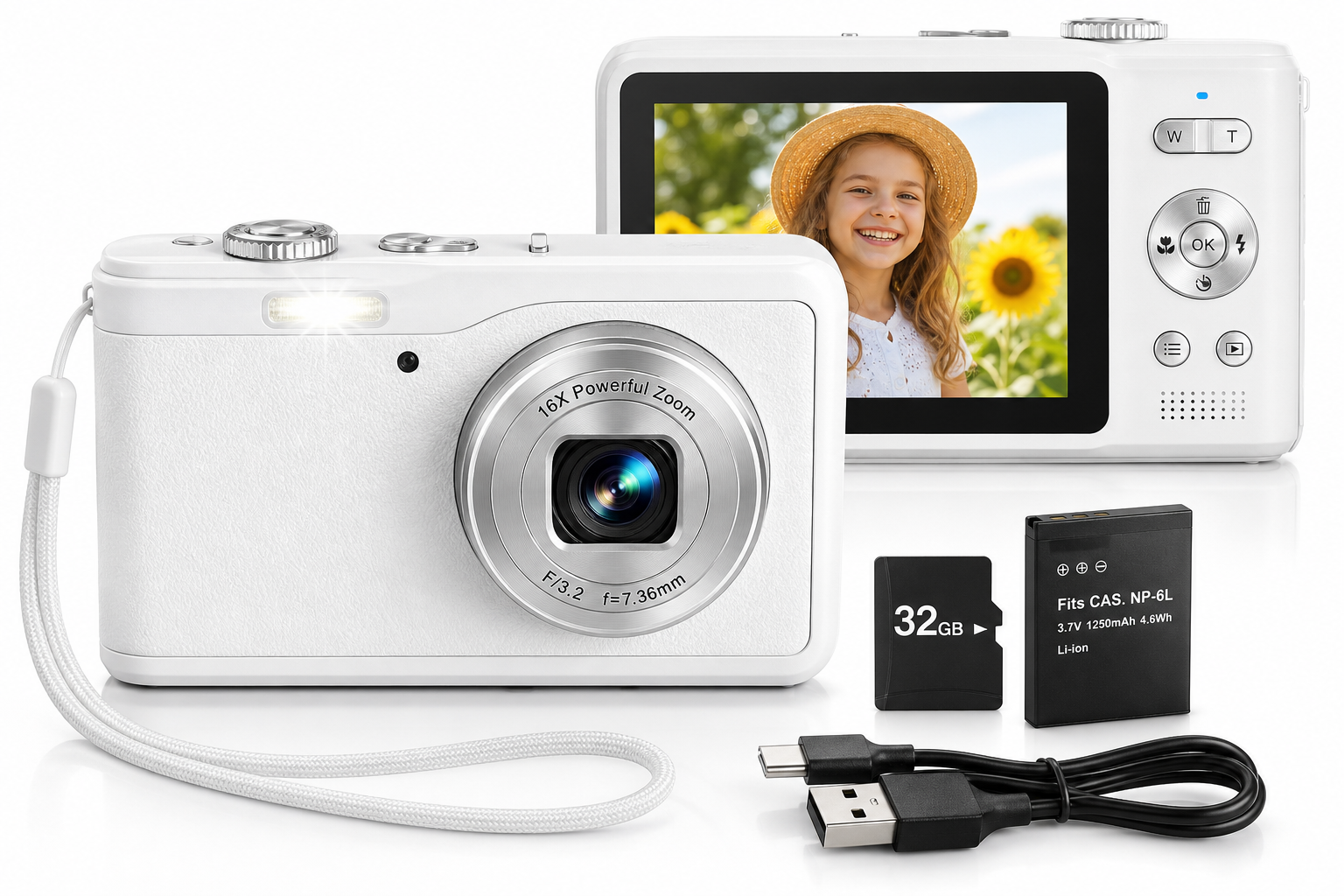
Overview
The Digital Camera for Kids, FHD 1080P 44MP Point and Shoot Digital Camera with Face Detect, Smile Capture, 16X Zoom, 20 Filters, Anti Shake, 32GB SD Card White Compact Vintage Camera for Kids Boys Girls is a compact point‑and‑shoot designed primarily for children, teens, and complete beginners. Styled to resemble a retro compact camera, it aims to give kids a dedicated device for photos and video without handing over an expensive smartphone.
On paper, the camera offers FHD 1080P video recording, a 44MP still image mode, 16X digital zoom, face detection, smile capture, basic anti‑shake, and a set of fun photo filters. A 32GB SD card is typically included, allowing kids to start shooting right away.
This model doesn’t compete with mid‑range smartphones or dedicated mirrorless cameras, but it does try to balance affordability, simplicity, and playful features in a child‑friendly package.
Standout Features
1. FHD 1080P video and 44MP stills (interpolated)
The camera records video at up to 1080P resolution and saves still photos at up to 44MP. In this class of kids’ cameras, those megapixel figures are usually achieved through software interpolation from a smaller sensor, rather than a true 44‑megapixel sensor. In real‑world use, that means:
- Video is generally suitable for casual clips and vlogging‑style recordings.
- Still photos are sharp enough for social media and small prints, but won’t match the detail or dynamic range of modern smartphones.
For a child or beginner, however, the resolution is more than adequate to experiment with composition and storytelling.
2. Face Detect and Smile Capture
Face detection and smile capture are surprisingly useful on a starter camera. When enabled:
- Face detect helps the camera prioritize focus and exposure on a person’s face.
- Smile capture can automatically trigger the shutter when it detects a smile, making it easier for kids to get expressive portraits without worrying about timing.
These automation features lower the barrier to entry for younger users who might not yet understand focus or exposure.
3. 16X Digital Zoom
The 16X zoom offered here is digital, not optical. That means the camera crops and enlarges the image rather than changing focal length via a moving lens:
- At low to moderate zoom levels, images remain usable for casual sharing.
- At maximum zoom, expect a noticeable drop in sharpness and more noise.
For kids, the zoom is still a fun way to experiment with framing distant subjects, as long as expectations about image quality are set appropriately.
4. 20 Creative Filters
The built‑in filters (often including black‑and‑white, vivid, sepia, and other stylized looks) are a major draw for children:
- Encourage experimentation and creative expression.
- Provide instant feedback on how different color and contrast treatments change the mood of a photo.
Having these filters available directly in the camera means kids can see results immediately, without needing editing software.
5. Anti‑Shake Support
The camera’s anti‑shake function is typically implemented as electronic image stabilization plus higher‑speed shutter behavior. In practice, this can help:
- Reduce blur in handheld shots, especially in good light.
- Make short video clips feel slightly steadier when walking or panning.
It will not eliminate all motion blur, especially in low light, but it improves the ratio of “keeper” shots for kids with unsteady hands.
6. Included 32GB SD Card
A 32GB SD card is included so the camera can be used immediately after unboxing:
- 32GB is ample for thousands of photos or many hours of short video clips at 1080P, depending on compression settings.
- Parents don’t need to purchase a separate card, which simplifies setup for first‑time users.
Supporting Features
Beyond the headline specs, this kids’ camera includes several secondary features that round out the experience:
- Compact, lightweight body – The camera is small enough for kids’ hands and easy to slip into a small bag or pocket.
- Vintage‑inspired styling – The white finish and compact shape evoke classic point‑and‑shoot cameras, which can appeal to kids who like “Y2K” or retro aesthetics.
- Simple menu system – Menus are typically icon‑based, with straightforward options for resolution, self‑timer, flash, and filters.
- Self‑timer support – Common timer options (for example, 2s/5s/10s) enable simple group shots and selfies without needing another person to press the shutter.
- Built‑in microphone and speaker – Enough for recording and playing back video clips with sound, suitable for quick vlogs or short narratives.
- USB connectivity – A USB cable (often USB‑C or Micro‑USB depending on the batch) is used for charging and transferring files to a computer.
- Rechargeable battery – A removable lithium‑ion battery is included, typically providing enough power for a casual day of shooting.
None of these features are unique, but together they make the product more complete for everyday kids’ use.
Usability
For kids and beginners
This camera is clearly designed for ease of use:
- Point‑and‑shoot workflow – Turn it on, point at the subject, and press the shutter. Auto exposure and focus handle the rest.
- Large buttons – The controls are usually placed and sized so children can operate them without fine motor precision.
- On‑screen prompts – Basic icons for battery, storage, and mode selection help users understand the current state at a glance.
Young kids may initially need guidance from an adult to navigate menus or switch between photo and video modes, but the learning curve is gentle compared to more complex cameras.
Ergonomics and handling
- Grip and weight – The camera’s lightweight plastic body is easy for kids to hold, though the flat design means a wrist strap (often included) is highly recommended to prevent drops.
- Button layout – Mode, shutter, and zoom controls are generally reachable with one hand, but very small children might occasionally press the wrong button.
- Screen visibility – The rear LCD is adequate for framing and reviewing shots indoors or in shade; in strong sunlight, reflections can make it harder to see details, which is typical at this price level.
Setup and file transfer
Initial setup is straightforward:
- Charge the battery fully.
- Insert the included 32GB SD card (if not pre‑installed).
- Power on and set language, date, and basic preferences.
- Start shooting.
To transfer photos and video:
- Connect the camera via USB to a computer and select the appropriate connection mode (often “Mass Storage”).
- Alternatively, remove the SD card and use a card reader with a phone, tablet, or computer.
Parents should be prepared to handle the first few transfers and show kids how files appear in a typical photo library.
Performance
Image quality
Given its sensor size and class, real‑world performance is best evaluated as “good enough for kids,” with some clear patterns:
- Daylight shots – Outdoors or in bright, even light, photos generally look colorful and reasonably sharp at lower ISO levels. Kids can capture playground scenes, pets, landscapes, and portraits with satisfying results.
- Indoor and low light – As light levels drop, noise and blur become more apparent. Anti‑shake and higher ISO can help, but motion blur is common when subjects move quickly.
- Dynamic range – High‑contrast scenes (bright sky plus shaded foreground) tend to lose detail in either highlights or shadows, which is normal for small sensors in this category.
For printing small photos, making collages, or sharing on social media, the quality is usually acceptable. Parents seeking gallery‑quality prints, however, should manage expectations or consider higher‑end gear.
Video quality
FHD 1080P video is a strong selling point, but the overall quality depends on conditions:
- Sharpness – Fine detail is adequate for casual clips, vlogs, and school projects.
- Stabilization – Anti‑shake helps somewhat, but walking or running while recording will still produce noticeable wobble.
- Audio – Built‑in microphones capture clear enough sound for voices at close range, though background noise and wind can be an issue.
For kids documenting trips, making simple YouTube‑style videos (with parental guidance), or recording family events, it does the job.
Focus and responsiveness
- Face detection generally locks onto faces quickly in good light, but can struggle in very low light or with fast movement.
- Shutter lag is modest; children may need a short adjustment period to learn to hold still just after pressing the shutter.
- Menu response is adequate, with occasional brief delays when changing modes or reviewing many images.
Overall responsiveness is acceptable for everyday snapshots, though not suited for fast sports or action photography.
Battery life
Typical usage patterns for kids involve bursts of shooting and reviewing images, which can be power‑intensive. In this context:
- A fully charged battery usually covers a day of light‑to‑moderate shooting.
- Frequent video recording, heavy use of the screen, and extended playback sessions will shorten runtime.
Keeping the USB cable handy or charging overnight before outings is a sensible routine.
Pros and Cons
Pros
- Kid‑friendly design with simple controls and a lightweight, compact body.
- 1080P video and 44MP still image mode provide more than enough resolution for beginner use.
- Face detect and smile capture features make portraits easier for children.
- 16X digital zoom gives kids creative flexibility for framing distant subjects.
- 20 creative filters encourage experimentation and artistic play.
- Anti‑shake support improves the chance of usable handheld shots in good light.
- Includes a 32GB SD card, so kids can start shooting right away.
- Retro, white compact styling appeals to kids who like vintage or Y2K aesthetics.
Cons
- Image quality lags behind modern smartphones, especially in low light or at high digital zoom levels.
- Digital zoom only, so significant zooming degrades sharpness and introduces noise.
- Plastic construction may not withstand repeated hard drops; a wrist strap and gentle handling are important.
- Screen visibility in bright sunlight can be limited, making framing and reviewing more difficult outdoors.
- Interpolation‑based megapixel claims (44MP) can set unrealistic expectations compared to larger, higher‑quality sensors.
- Audio and stabilization are basic; serious video creators may find them limiting.
Summary
The Digital Camera for Kids, FHD 1080P 44MP Point and Shoot Digital Camera with Face Detect, Smile Capture, 16X Zoom, 20 Filters, Anti Shake, 32GB SD Card White Compact Vintage Camera for Kids Boys Girls is best understood as a first camera for children and beginners who want a dedicated device to explore photography and video.
It offers a solid blend of kid‑friendly features: straightforward point‑and‑shoot operation, fun filters, face and smile detection, video recording, and an included 32GB SD card. While image and video quality can’t match mid‑range phones or advanced cameras—especially in challenging light or at high zoom—the performance is generally sufficient for everyday memories, school projects, and creative play.
For parents who want their child to learn the basics of framing, timing, and visual storytelling without relying on a smartphone, this compact kids’ camera is a reasonable, low‑pressure entry point. As long as expectations are aligned with its budget‑friendly design and small‑sensor limitations, it can be a fun and educational tool that encourages kids to look at the world more thoughtfully through a lens.