
HP OmniBook 3 16-by0199nr Review: Big 2K Touchscreen Productivity Laptop on a Budget
This review covers the HP OmniBook 3 16-by0199nr, a 16-inch 2K touchscreen Windows 11 Home laptop built around an AMD Ryzen 3 processor, 8 GB LPDDR5 RAM, and a 256 GB PCIe NVMe SSD. It examines the large 16:10 display, thin-and-light design, port selection, and day-to-day performance with the integrated AMD Radeon 610M GPU. The article highlights who this machine is best suited for—primarily students and home or office users focused on web, documents, media consumption, and light creative tasks—while outlining important considerations such as non-upgradable RAM, limited storage capacity, and modest graphics performance. It concludes with key pros and cons, plus a brief look at typical alternative categories buyers might compare with this device.
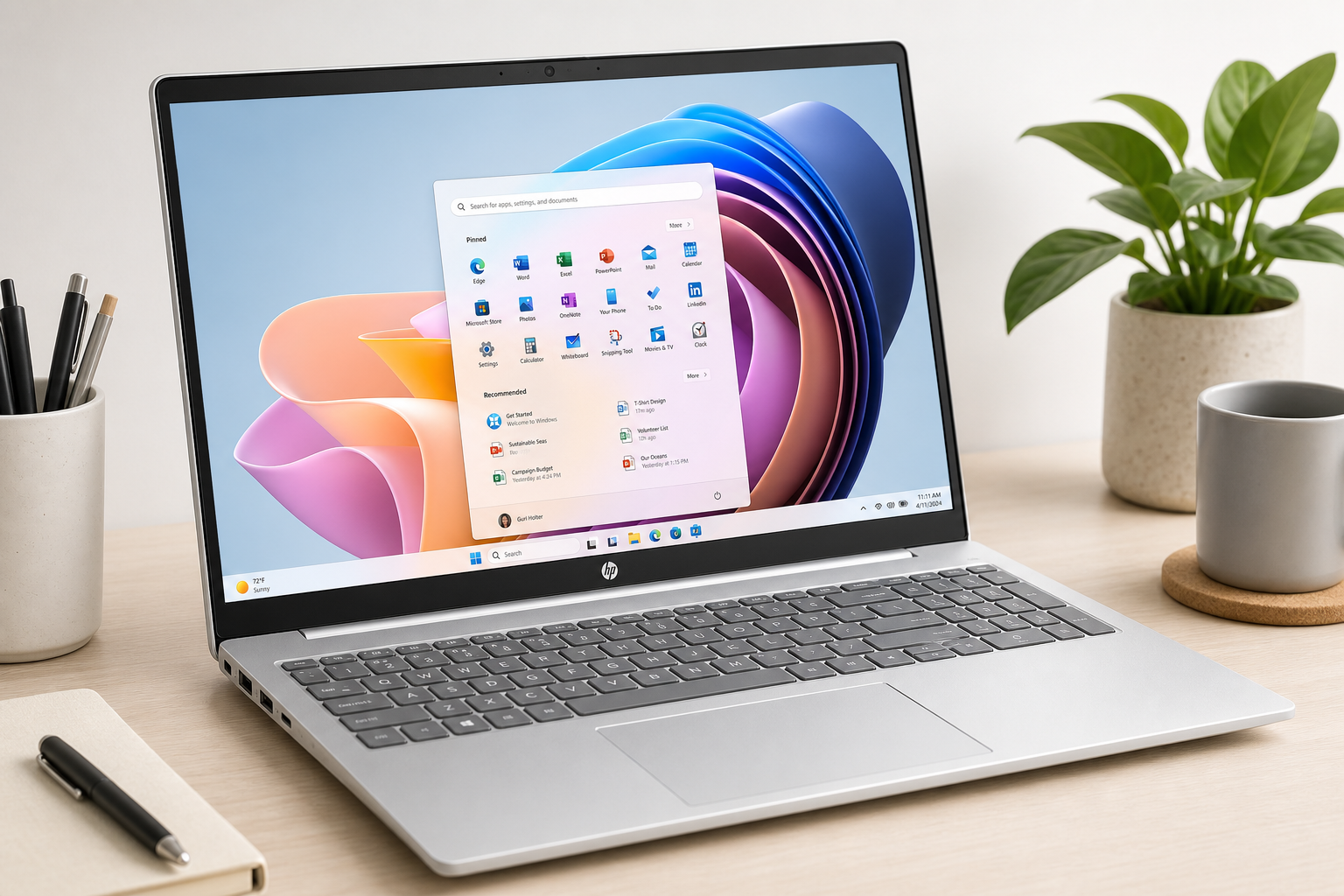
Product Summary
The HP OmniBook 3 16 inch Laptop PC, 2K Touchscreen, AMD Ryzen 3 30, 8 GB RAM, 256 GB SSD, AMD Radeon 610M GPU, Windows 11 Home, Mica Silver, 16-by0199nr is a 16-inch productivity-focused notebook that aims to deliver an expansive 2K touchscreen in a relatively slim, lightweight chassis.
At its core, this configuration pairs an AMD Ryzen 3 30–series processor (Ryzen 3 7320U class) with 8 GB of LPDDR5-5500 memory and a 256 GB PCIe NVMe M.2 SSD, backed by AMD Radeon 610M integrated graphics and Windows 11 Home. The 16-inch IPS display offers a 2K 1920 × 1200 resolution, a 16:10 aspect ratio, touch support, and up to 300 nits of brightness with anti-glare coating and micro-edge bezels. Connectivity includes two USB-A ports (5 Gbps), two USB-C ports (10 Gbps, Power Delivery 3.1, DisplayPort 1.4, HP Sleep and Charge), HDMI 2.1, and a headphone/microphone combo jack, giving it strong I/O flexibility for external displays and peripherals.
The result is a large-screen everyday laptop positioned for students, home users, and professionals who prioritize workspace and clarity over raw performance.
Target Users
This HP OmniBook 3 16-by0199nr is best suited for:
- Students and educators who want a large, 16-inch 2K display for reading, writing, and multitasking across multiple windows.
- Office and home productivity users focused on email, web browsing, video calls, document editing, and spreadsheets.
- Media consumers who value a bigger screen for streaming, web content, and casual photo viewing.
- Light creators doing basic photo edits, simple graphics, or casual content work that doesn’t require a powerful dedicated GPU.
- Users who rely on USB-C and external displays, thanks to dual USB-C ports with DisplayPort 1.4 and HDMI 2.1.
It is less ideal for:
- Heavy gamers or users needing powerful discrete graphics.
- Power users who need more than 8 GB of RAM for large data sets, complex multitasking, or professional creative suites.
- Buyers who want extensive internal storage without relying on external drives or cloud storage.
Main Benefits
1. Large 16-inch 2K Touchscreen with 16:10 Aspect Ratio
The standout feature is the 16-inch IPS touchscreen with a 1920 × 1200 2K-class resolution, offering more vertical space than traditional 16:9 panels. The 16:10 aspect ratio makes it easier to work with long documents, spreadsheets, and web pages without constant scrolling, while touch support adds flexibility for navigation, zoom, and inking with compatible pens.
The micro-edge design reduces bezels for a more modern look and better screen-to-body ratio, while the anti-glare coating and up-to-300-nit brightness make it usable in typical indoor environments.
2. Modern Entry-Level Ryzen Platform
The AMD Ryzen 3 30–series CPU (7320U class) and AMD Radeon 610M graphics form a modern, efficient platform for daily tasks. Paired with LPDDR5-5500 RAM, it delivers smooth performance for:
- Web browsing and streaming
- Office apps (Word, Excel, PowerPoint, Google Docs)
- Email and productivity suites
- Light photo editing and simple creative workflows
The platform is designed for efficiency and responsiveness rather than high-end compute or gaming workloads.
3. Fast PCIe NVMe SSD Storage
The 256 GB PCIe NVMe M.2 SSD offers significantly faster boot and load times compared to older SATA drives. It improves system responsiveness, makes Windows 11 feel snappy, and reduces wait times for opening apps and large documents.
4. Strong Port Selection and Modern Connectivity
Despite its slim profile, this OmniBook includes:
- 2 × USB Type-A (5 Gbps) for legacy peripherals
- 2 × USB Type-C (10 Gbps) with Power Delivery 3.1, DisplayPort 1.4, and HP Sleep and Charge
- 1 × HDMI 2.1 video output
- 1 × 3.5 mm headphone/mic combo jack
Dual USB-C ports plus HDMI make it easy to drive one or more external displays, connect docks, or charge from USB-C power adapters, increasing flexibility for both desk and mobile use.
5. Thin-and-Light 16-inch Form Factor
At around 3.6 lb (1.63 kg), this 16-inch notebook is relatively portable for its screen size. The Mica Silver finish gives it a clean, understated aesthetic suitable for school, office, or home.
Key Considerations
Before choosing the HP OmniBook 3 16-by0199nr, keep these points in mind:
1. 8 GB RAM is Soldered (Non-Upgradeable)
The 8 GB LPDDR5 RAM is onboard, which typically means it cannot be upgraded later. Users who run many memory-intensive apps at once, work with large Photoshop projects, or keep dozens of browser tabs open may find 8 GB limiting over time.
2. 256 GB SSD Capacity
While the 256 GB PCIe SSD is fast, its capacity can feel tight if you store many large files—such as high-resolution photos, videos, or multiple large games. You can mitigate this by relying on:
- Cloud storage for documents and media
- External SSDs or HDDs via USB-C or USB-A
- Selective local file management
3. Integrated Graphics Only
The AMD Radeon 610M iGPU is appropriate for HD/2K video playback, web graphics, and basic photo editing, but it is not designed for modern AAA gaming or heavy GPU workloads (3D rendering, complex video editing with effects, etc.). Casual or older titles may run at reduced settings, but serious gamers should look for a laptop with a dedicated GPU.
4. Display Characteristics
The 2K 1200p IPS panel is solid for productivity and everyday visuals, but:
- Color coverage is rated around 62.5% sRGB, which is fine for general use but not ideal for color-critical work.
- 300 nits of brightness is typical but not outstanding; outdoor visibility in bright sun will be limited.
5. Long-Term Flexibility
With fixed RAM and a modest SSD capacity, this machine is best approached as a focused productivity and media laptop, not a platform to heavily upgrade over multiple years. If you anticipate rapidly growing performance demands, you may want to consider higher-tier OmniBook configurations or similar devices with more memory and storage.
Pros
- Expansive 16-inch 2K (1920 × 1200) IPS touchscreen with 16:10 aspect ratio for better productivity.
- Modern AMD Ryzen 3 platform with efficient daily performance for office and web workloads.
- Fast PCIe NVMe SSD for quick boot times and snappy app launches.
- Generous port selection, including 2× USB-C (Power Delivery, DisplayPort 1.4, Sleep and Charge), 2× USB-A, and HDMI 2.1.
- Relatively light for a 16-inch laptop at about 3.6 lb (1.63 kg).
- Anti-glare panel with micro-edge design for a modern, usable screen in most indoor lighting.
- Windows 11 Home preinstalled, ready for mainstream productivity software.
Cons
- Only 8 GB of soldered LPDDR5 RAM, limiting multitasking headroom and future upgradability.
- 256 GB SSD may be restrictive for users with large local libraries of media or games.
- Integrated AMD Radeon 610M graphics are not suitable for intensive gaming or GPU-heavy creative workloads.
- Display color coverage (~62.5% sRGB) is not targeted at color-critical professionals.
- Brightness (around 300 nits) is adequate indoors but less ideal for bright outdoor use.
Alternatives
If you like the HP OmniBook 3 16-by0199nr concept but want to explore adjacent options, consider these categories of alternatives when searching (specific models will depend on retailers and current availability):
-
Similar 16-inch Productivity Laptops with More RAM/Storage
Look for configurations of the HP OmniBook 3 or comparable 16-inch notebooks that offer 16 GB RAM and 512 GB or larger SSDs. These variants provide more breathing room for multitasking and local file storage while keeping the same large-screen productivity focus. -
Smaller 14–15.6 inch Ultrabooks
If portability is a higher priority than screen size, 14–15.6 inch ultrabooks with Ryzen 5 or Intel Core i5-class processors and 16 GB RAM may deliver similar or better performance in a more compact form factor. -
Creator-Focused Laptops with Discrete Graphics
Users interested in photo/video editing, 3D work, or gaming should consider creator or gaming laptops that include dedicated GPUs (e.g., NVIDIA GeForce RTX series). These machines will handle GPU-heavy tasks far better, though often at the cost of weight, battery life, and price.
When evaluating alternatives, compare:
- RAM capacity and whether it is upgradeable
- SSD size and expansion options
- GPU type (integrated vs discrete)
- Display size, resolution, brightness, and color coverage
- Port layout (especially USB-C and display outputs)
Conclusion
The HP OmniBook 3 16-by0199nr is a compelling choice if you value a large 16-inch 2K touchscreen, productive 16:10 aspect ratio, and solid everyday performance in a relatively light chassis. Its Ryzen 3 platform, fast NVMe SSD, and versatile port selection make it well-suited for students, home users, and office workers whose workloads center on web, documents, streaming, and light creative tasks.
The trade-offs—fixed 8 GB RAM, modest 256 GB storage, and integrated-only graphics—mean it is not designed as a long-term powerhouse for heavy multitasking, gaming, or professional media production. If your primary goal is a big, comfortable workspace for everyday computing with modern connectivity, this OmniBook configuration delivers a balanced, productivity-first experience. If you expect to grow into more demanding workloads, consider stepping up to configurations or competitors with more memory, storage, and GPU capability while using this model as a baseline for size, display, and usability expectations.