
HP Stream 14" HD Student & Business Laptop Review: Light Productivity with Massive Storage
This review examines the **HP Stream 14" HD Student & Business Laptop with AI Copilot, Intel Processor N150, 4GB RAM, and 1.12TB of combined storage** (128GB UFS plus 1TB via an included docking station). Aimed at students and light office users, it pairs a portable 14-inch HD anti-glare display with Windows 11, 1 Year of Office 365, Wi‑Fi 6, and Bluetooth 5.4. We evaluate its setup experience, day-to-day usability for web browsing and school work, real-world performance limits with only 4GB of RAM, and how the generous external storage and AI Copilot features fit into modern study and productivity workflows. The article also highlights key strengths—such as portability, connectivity, and bundled accessories—alongside compromises like basic display resolution, modest memory, and reliance on external storage, to help readers decide whether this HP Stream configuration is the right fit for their needs.
Introduction
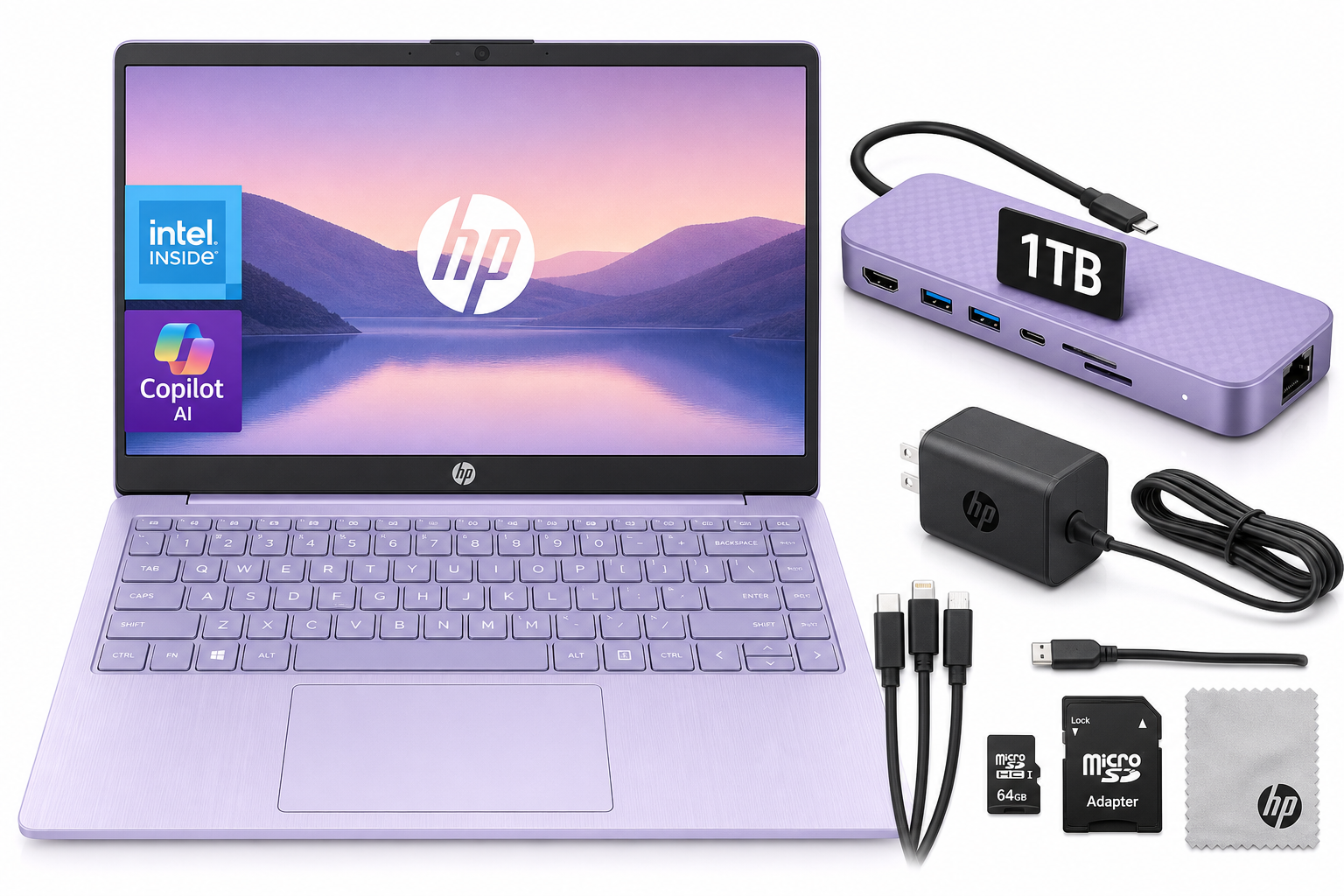
The HP Stream 14" HD Student & Business Laptop with AI Copilot, Intel Processor N150, 4GB RAM, 1.12TB Storage (128GB UFS + 1TB Docking Station), 1 Year Office 365, 720p Webcam, Win 11, Lavender Purple targets students, casual home users, and light business tasks on a tight budget. It combines a 14-inch HD anti-glare display, Intel Processor N150, Windows 11, and a year of Microsoft Office 365 with a surprisingly generous total storage footprint thanks to its included 1TB docking station.
This configuration prioritizes portability and basic productivity over raw power. With 4GB of DDR4 RAM and integrated Intel graphics, it is best suited for web browsing, document editing, online classes, and streaming—not heavy multitasking or creative workloads. The lavender purple finish and compact 3.24 lb chassis add some personality while staying classroom- and office-friendly.
Below, we break down how it performs from first setup through daily use, including what it does well and where potential buyers should be cautious.
Setup / Getting Started
Getting started with the HP Stream 14 is straightforward, even for first-time Windows users.
-
Unboxing and hardware
In the box, you can expect the laptop itself, the AC power adapter, and the bundled 7‑in‑1 docking station with 1TB of storage, plus accessories such as a Type‑C data cable, 3‑in‑1 charging cable, microSD card with adapter, and a cleaning cloth. The docking station not only expands storage but also offers extra connectivity, making it central to the overall package. -
Initial Windows 11 setup
Powering on launches the standard Windows 11 out-of-box experience. You’ll walk through language and region selection, Wi‑Fi configuration, Microsoft account sign‑in, and basic privacy settings. On first boot, plan for Windows updates and HP utilities to install, which can take some time on entry-level hardware. -
Activating Microsoft 365 (Office 365)
A key value point is the 1‑year Microsoft Office 365 subscription, which unlocks Word, Excel, PowerPoint, and other apps. Activation typically involves signing into or creating a Microsoft account and redeeming the included subscription from the preinstalled Office app or via your Microsoft account portal. -
Connecting the 1TB docking station
The laptop’s USB‑C port connects to the included 7‑in‑1 dock. Once plugged in, the extra 1TB of storage should appear as a separate drive in Windows Explorer. It’s wise to immediately set up folders for school documents, media, and backups here, keeping the faster 128GB UFS internal storage for Windows, applications, and frequently used files. -
Enabling AI Copilot and personalization
With Windows 11, AI Copilot (where supported) can assist with tasks like drafting emails, summarizing notes, or searching settings. After signing in with a Microsoft account and applying updates, Copilot can typically be accessed from the taskbar or a keyboard shortcut. This feature can be especially helpful for students working on essays or research tasks.
Overall, the out-of-box experience is simple, but expect some patience while updates install and storage is organized between internal and docked drives.
Daily Usage
In day-to-day tasks, the HP Stream 14 is built for basic productivity and learning rather than demanding workloads.
Productivity and school work
With Intel Processor N150 and 4GB DDR4 RAM, the laptop handles:
- Web-based research with a modest number of browser tabs
- Word processing, spreadsheets, and presentations via Office 365
- Email, messaging, and cloud-based collaboration tools
- Lightweight web apps and educational platforms
To keep things smooth, it’s best to avoid running too many heavy browser tabs or background apps simultaneously. Closing unused windows and extensions makes a noticeable difference.
Media consumption and online classes
The 14" HD (1366×768) anti-glare display offers enough sharpness for documents, streaming video, and course content, though it’s not as detailed as a Full HD panel. The anti-glare coating helps in bright classrooms or near windows, reducing reflections.
The HP True Vision 720p HD webcam with dual-array microphones is adequate for online lectures and video calls. Image quality is typical for a budget laptop—good enough for Zoom, Teams, and classroom platforms, especially in decent lighting.
Portability and ergonomics
At around 3.24 lbs with a slim 14‑inch footprint, this laptop is easy to carry in a backpack between classes or to a coffee shop. The lavender purple colorway appeals to users who want something more distinctive than standard black or silver.
The keyboard layout is standard HP, suitable for typing essays, notes, and reports. Key travel and feedback are tuned for comfort rather than gaming. The touchpad is functional for general navigation; pairing a wireless mouse improves the experience for longer sessions.
Connectivity and ports
For a compact system, port selection is versatile:
- 1 × USB Type‑C (for data and the docking station)
- 2 × USB Type‑A for legacy peripherals
- HDMI 1.4b to connect to an external monitor or projector
- Headphone/microphone combo jack
- Media card reader for quickly importing photos or transferring files
- AC smart pin for charging
Wireless connectivity includes Wi‑Fi 6 and Bluetooth 5.4, which helps maintain stable connections in crowded campus networks and supports newer peripherals like modern earbuds and mice.
Performance & Reliability
The HP Stream 14 is an entry-level Windows 11 laptop, and its performance profile reflects that positioning.
Processor and memory
The Intel Processor N150 is designed for low-power, everyday workloads rather than heavy computation. Combined with 4GB of RAM, it performs adequately for:
- Single‑task or light multi‑task scenarios (e.g., Word + a few browser tabs)
- Web apps and streaming media
- Basic productivity suites like Office 365
However, performance can feel constrained when:
- Dozens of browser tabs are open simultaneously
- Multiple heavy apps run alongside background updates
- You attempt more demanding tasks like photo/video editing or large code projects
For long-term comfort, users should adopt good digital hygiene: close background apps, limit startup programs, and periodically restart the laptop.
Storage configuration
A standout feature is the 1.12TB total storage:
- 128GB UFS internal storage: Faster access speeds, best used for Windows, key apps, and frequently accessed files.
- 1TB on the included docking station: Ideal for large media libraries, downloaded lectures, archives, and backups.
This setup gives far more capacity than most budget laptops, making it suitable for students who want to keep years of coursework, reference materials, and media on hand without constantly juggling external drives.
Graphics and multimedia
Integrated Intel graphics are adequate for HD video playback, basic image editing, and light casual games from app stores or the web. This is not a gaming or creative workstation; titles that require powerful GPUs or high memory bandwidth will run poorly or not at all.
Reliability and thermals
The low-power N‑series CPU runs cool and is generally energy efficient. Under typical student workloads—browsing, document editing, streaming—fan noise is usually modest. The HD display and energy-efficient components can contribute to solid battery endurance in everyday use, though exact runtime depends heavily on brightness settings and workload.
What Works Well
-
Student- and office-friendly feature set
The combination of Office 365 for 1 year, Windows 11, and AI Copilot makes this laptop ready for essays, reports, and presentations right out of the box, with tools that directly support studying and light business tasks. -
Generous total storage with 1TB docking station
Unlike many entry-level machines that quickly run out of space, this HP Stream includes 1.12TB of combined storage. The 1TB docking station reduces reliance on separate external drives and helps keep large files, media, and backups easily accessible. -
Portable and classroom-ready design
At around 3.24 lbs with a slim profile and 14‑inch display, it strikes a good balance between screen size and portability. The lavender purple finish adds personality without sacrificing professionalism. -
Modern connectivity (Wi‑Fi 6 and Bluetooth 5.4)
Support for Wi‑Fi 6 is particularly beneficial on crowded networks (campuses, shared housing, offices), and Bluetooth 5.4 improves compatibility and stability with newer peripherals. -
Wide port selection for peripherals and displays
With USB‑C, dual USB‑A, HDMI, a media card reader, and audio jack, the HP Stream 14 handles external monitors, projectors, USB drives, and other devices with minimal need for extra dongles. -
AI Copilot integration
Integrated AI assistance can help draft text, summarize notes, or streamline routine tasks—useful for both students and office workers who live in documents and emails.
What Could Be Improved
-
Limited 4GB RAM for modern multitasking
While technically sufficient for light use, 4GB of RAM is restrictive for modern Windows 11 workflows. Users who keep multiple apps and many tabs open may experience slowdowns and should manage their workload carefully. -
Only HD (1366×768) display resolution
The 14" HD panel is functional but not as sharp as Full HD, especially for users who spend hours reading text or frequently split the screen between apps. Competing devices in a similar category sometimes offer 1080p displays. -
Reliance on external storage for most capacity
The large 1TB capacity lives on the docking station, meaning full storage access depends on having the dock connected. Users who move often without the dock may wish the internal storage were larger. -
Not suited for heavy workloads or gaming
The Intel N150 CPU and integrated graphics are optimized for efficiency, not power. Tasks like serious photo/video editing, advanced 3D work, or modern AAA gaming are outside this laptop’s comfort zone. -
Potential learning curve for AI features
AI Copilot is powerful, but taking full advantage of it requires some experimentation and familiarity. Less tech-savvy users might underutilize this capability.
Overall Impression
The HP Stream 14" HD Student & Business Laptop with AI Copilot, Intel Processor N150, 4GB RAM, and 1.12TB of storage is a solid choice for students, casual home users, and light office workers who value portability, ample storage, and built-in productivity tools over sheer performance.
Its strengths lie in:
- A lightweight 14‑inch form factor suitable for daily commuting
- Windows 11 plus a 1‑year Office 365 subscription for immediate productivity
- AI Copilot support to assist with writing and research tasks
- A generous storage package anchored by the 1TB docking station
- Modern connectivity via Wi‑Fi 6, Bluetooth 5.4, and a useful range of ports
At the same time, prospective buyers should be aware of its limitations: 4GB of RAM and an entry-level processor mean it’s best reserved for basic workloads. The HD resolution display is serviceable rather than impressive, and the bulk of its storage is external via the dock.
If your primary needs are web browsing, email, word processing, online classes, and streaming, and you appreciate the extra storage and AI assistance, this HP Stream configuration is a compelling, student-friendly option. However, users who anticipate heavy multitasking, creative applications, or gaming should consider a model with more RAM, a stronger CPU, and a higher-resolution display.
To learn more or see full specifications, you can visit the product page: HP Stream 14" HD Student & Business Laptop with AI Copilot, Intel Processor N150, 4GB RAM, 1.12TB Storage, 1 Year Office 365, 720p Webcam, Win 11, Lavender Purple on Amazon.