
Instant Camera, Front Rear Dual Selfie Kids Camera with 1080P Videos – In‑Depth Review
This review covers the **Instant Camera, Front Rear Dual Selfie Kids Camera with 1080P Videos**, a kid‑friendly instant print digital camera designed for children aged 3–12. We examine its dual‑lens design for selfies and regular shots, instant black‑and‑white printing, 1080P video recording, durability, and creative extras such as frames and drawing tools. The article evaluates real‑world usability for toddlers and older kids, highlights strengths like ease of use and screen‑free engagement, and notes trade‑offs around print quality, consumable paper, and image detail, to help parents decide if this model is a good fit as a holiday, birthday, or travel gift.
Quick Summary
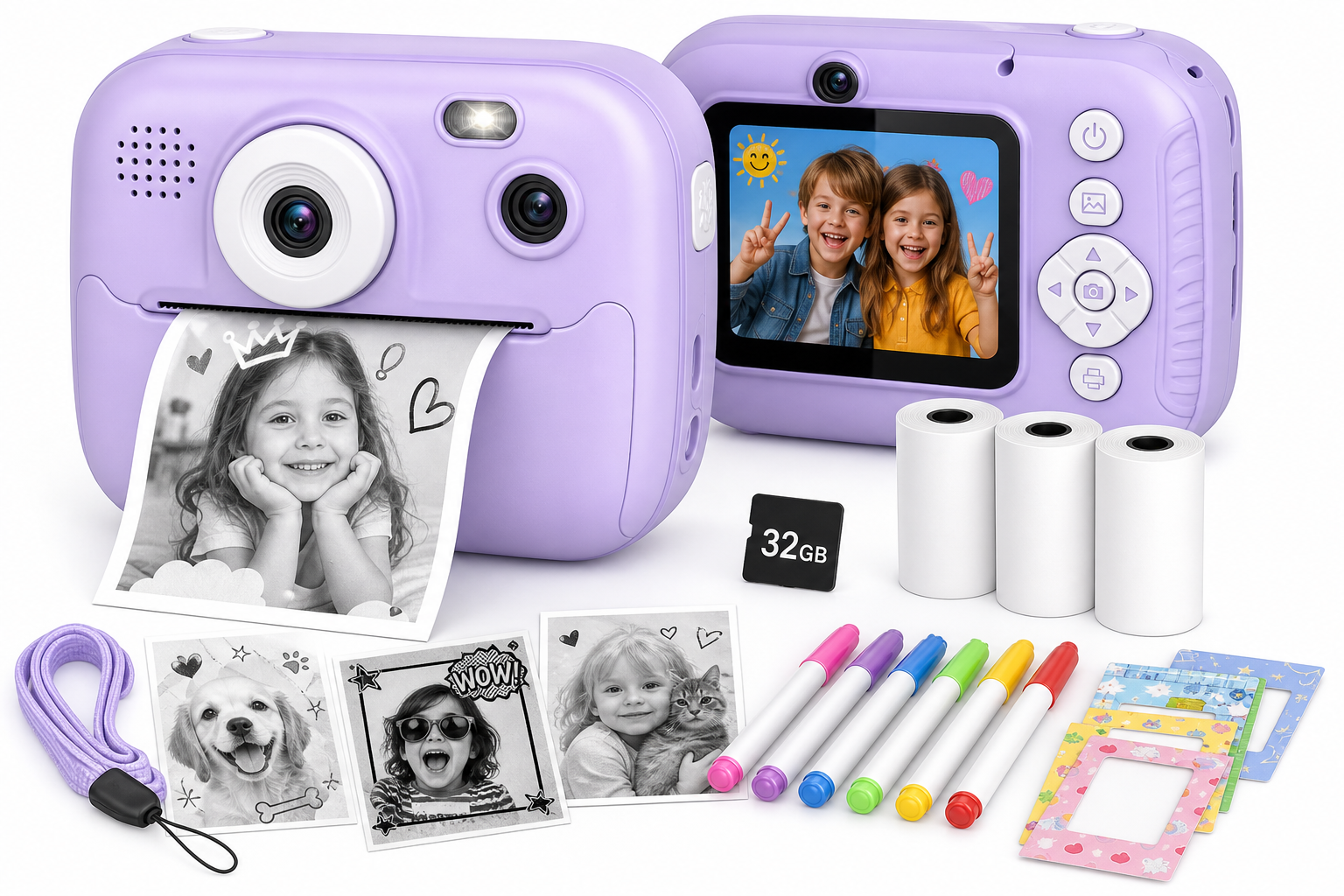
The Instant Camera, Front Rear Dual Selfie Kids Camera with 1080P Videos is a compact, child‑oriented instant print camera aimed at kids roughly 3–12 years old. It combines a dual‑lens digital camera (front and rear) with simple 1080P video recording and a built‑in thermal printer that outputs small black‑and‑white photos in about a second.
It’s designed as a screen‑light, creativity‑first toy: children can snap photos, shoot short clips, instantly print their favorites, and decorate them using included pens and frames. The emphasis is on fun and immediacy rather than photographic perfection, making it especially appealing for younger kids who love tangible keepsakes.
Detailed Analysis
Design and Build
This kids’ instant camera features a chunky, rounded body sized for small hands. The housing is typically made from lightweight plastic with a rubberized or matte finish to add grip. Controls are laid out simply: a power button, shutter, navigation keys, and a dedicated printing button, so children can learn the basics quickly.
A small rear color screen lets kids preview shots and review what they’ve captured. The dual‑lens setup includes:
- Front lens for standard photos and scenes.
- Rear/selfie lens so kids can flip the camera around and take self‑portraits without guesswork.
The built‑in printer uses thermal paper rolls, so there’s no ink to manage. Prints emerge from a slot on the top or side of the body and are monochrome, which keeps operating costs lower than color‑film instant cameras and simplifies maintenance.
Core Features
Key capabilities typically include:
- Front and rear dual selfie lenses – enables selfies and regular shots without rotating the body.
- 1080P video recording – good enough for casual clips of playtime, pets, or travel moments.
- Instant black‑and‑white printing – one‑button printing with output in roughly a second, ideal for impatient younger kids.
- Digital photo storage – color images are saved to a microSD card (often 32 GB when included), letting you transfer files to a computer.
- Simple interface and icons – large on‑screen icons guide kids who can’t yet read fluently.
- Built‑in battery with USB charging – no need to replace disposable batteries.
Some bundles for this style of camera also include multiple rolls of thermal paper and colored pens or stickers, encouraging kids to decorate prints and turn them into crafts or mini scrapbooks.
Imaging and Print Quality
The still image resolution and sensor are tuned toward fun snapshots rather than detailed photography. In practice:
- Photos are bright and colorful on screen but may show noticeable noise or softness in low light.
- 1080P videos are adequate for documenting everyday moments, though stabilization is basic, so rapid movement can look shaky.
The instant prints are the standout feature, but it’s important to set expectations:
- Prints are small, black‑and‑white, and relatively low‑resolution.
- Fine text and intricate details may appear fuzzy.
- Output is comparable to a miniature receipt‑style printer rather than full‑photographic lab prints.
For most kids, especially under 10, this is more than sufficient—what matters most is the novelty of capturing a moment and holding a picture right away.
Durability and Safety
The camera’s chunky design and light weight make it easier for young children to carry without strain. Rounded corners and a generally shock‑resistant shell help protect against everyday bumps and drops.
Common kid‑friendly touches you can expect from this type of product include:
- Lanyard or neck strap attachment to reduce drops.
- Enclosed battery that charges via USB, avoiding loose cells.
- Eye‑protection style screen (low brightness, small size) to limit strain compared with larger tablets.
Parents should still supervise very young toddlers, but for school‑age kids, it’s built to withstand typical household use and outings.
User Experience
Setup
Out of the box, setup is straightforward:
- Charge the camera via the USB cable.
- Insert the microSD card if it isn’t pre‑installed.
- Load a roll of thermal paper into the print compartment.
- Power on and follow simple on‑screen prompts.
Most kids can learn the basic operations—taking a photo, switching lenses, and printing—within minutes, especially with a quick demonstration from an adult.
Everyday Use for Different Ages
- Ages 3–5: Younger children tend to enjoy pressing the shutter and seeing immediate prints more than reviewing images on the screen. Adult help may be needed to manage paper rolls and charging.
- Ages 6–9: This is the sweet spot. Kids can experiment with selfies, short videos, creative frames, and decorating printed pictures for scrapbooks, cards, or room decorations.
- Ages 10–12: Older kids might find the image quality modest compared with smartphones, but many still appreciate the instant‑print novelty for parties, journaling, or travel memories.
Interface and Controls
Menus usually rely on big icons, simple labels, and a few directional buttons. Features like:
- Switching between photo and video modes.
- Toggling front/rear lens.
- Selecting frames, filters, or scenes.
are accessible with just a few clicks. Younger users may occasionally trigger settings they don’t understand (like language changes), but defaults are easy to restore with help from the manual.
Battery Life and Paper Management
The rechargeable battery is generally sufficient for a day’s light use—dozens of photos, a few video clips, and intermittent printing. Video recording and frequent printing drain the battery faster, so it’s wise to charge nightly if the camera is used daily.
Managing paper rolls becomes part of the experience:
- Kids learn that each print consumes paper, which can be a gentle way to introduce concepts of resource use and planning.
- Parents will need to keep spare rolls on hand for longer trips or parties.
Pros
- Dual‑lens design allows easy switching between standard photos and selfies without awkward hand positions.
- Instant black‑and‑white prints provide tangible keepsakes kids can share, trade, or decorate.
- 1080P video recording lets children capture short clips of events, holidays, and everyday adventures.
- Kid‑friendly interface with simple icons and buttons suits early readers.
- Compact and lightweight, suitable for small hands and travel.
- Ink‑free thermal printing avoids messy cartridges and keeps maintenance simple.
- Encourages creativity and screen‑light play, combining photography, crafts, and storytelling.
- Broad age range (3–12) means siblings can share the same device.
Cons
- Prints are monochrome and relatively low‑detail, so they won’t match the quality of traditional photo prints.
- Image and video quality trail modern smartphones, especially in low light or fast movement.
- Thermal paper is a consumable, so replacement rolls are an ongoing cost and require planning.
- Plastic build, while lightweight, may feel less premium and can still be damaged by very rough handling.
- Small screen size and basic speakers (if present) limit the appeal for older, tech‑savvy kids used to tablets and phones.
Value Assessment
The Instant Camera, Front Rear Dual Selfie Kids Camera with 1080P Videos is best understood as a creative toy that happens to be a camera, rather than a budget alternative to a full‑fledged digital camera or smartphone.
Its value comes from:
- Instant gratification: kids capture and hold a physical photo within seconds.
- Tactile creativity: prints can be colored, cut, pasted into journals, or shared with friends and family.
- Engagement away from big screens: encourages exploration of the real world through a lens.
Parents looking for maximum image quality or advanced controls may prefer a more traditional compact digital camera. But for children who are more excited by the experience of taking, printing, and crafting with photos, this device offers strong value in its niche.
For occasions like birthdays, holidays, and vacations, it can serve as a memorable, activity‑rich gift that gets kids documenting their own stories.
Final Thoughts
The Instant Camera, Front Rear Dual Selfie Kids Camera with 1080P Videos strikes a thoughtful balance between simplicity, fun, and functionality for young photographers. Its dual‑lens design, instant black‑and‑white printing, and easy‑to‑use controls make it especially well‑suited to kids who enjoy hands‑on activities and tangible keepsakes.
While it doesn’t compete with smartphones in image detail or color accuracy, it isn’t trying to. Instead, it offers something children’s tablets and phones often don’t: a low‑distraction, creativity‑centered way to capture and share real‑world experiences.
If you’re searching for a gift that encourages curiosity, storytelling, and craft‑based play for kids aged 3–12, this instant print kids camera is a compelling option to consider.