
Late 2020 Apple MacBook Air M1 (Renewed) Review: Still a Strong Everyday MacBook Option
This review covers the renewed **Late 2020 Apple MacBook Air with Apple M1 chip (13.3-inch, 8GB RAM, 128GB SSD) in Space Gray**, focusing on performance, battery life, display quality, build, and the trade-offs of buying a refurbished Apple laptop. We examine which users benefit most from this configuration, the advantages of Apple’s M1 architecture for everyday and professional workloads, and the main limitations of 8GB RAM and 128GB SSD storage. The article also outlines key pros and cons, purchasing considerations specific to renewed hardware, and a few alternative options buyers might compare against before deciding.
Product Summary
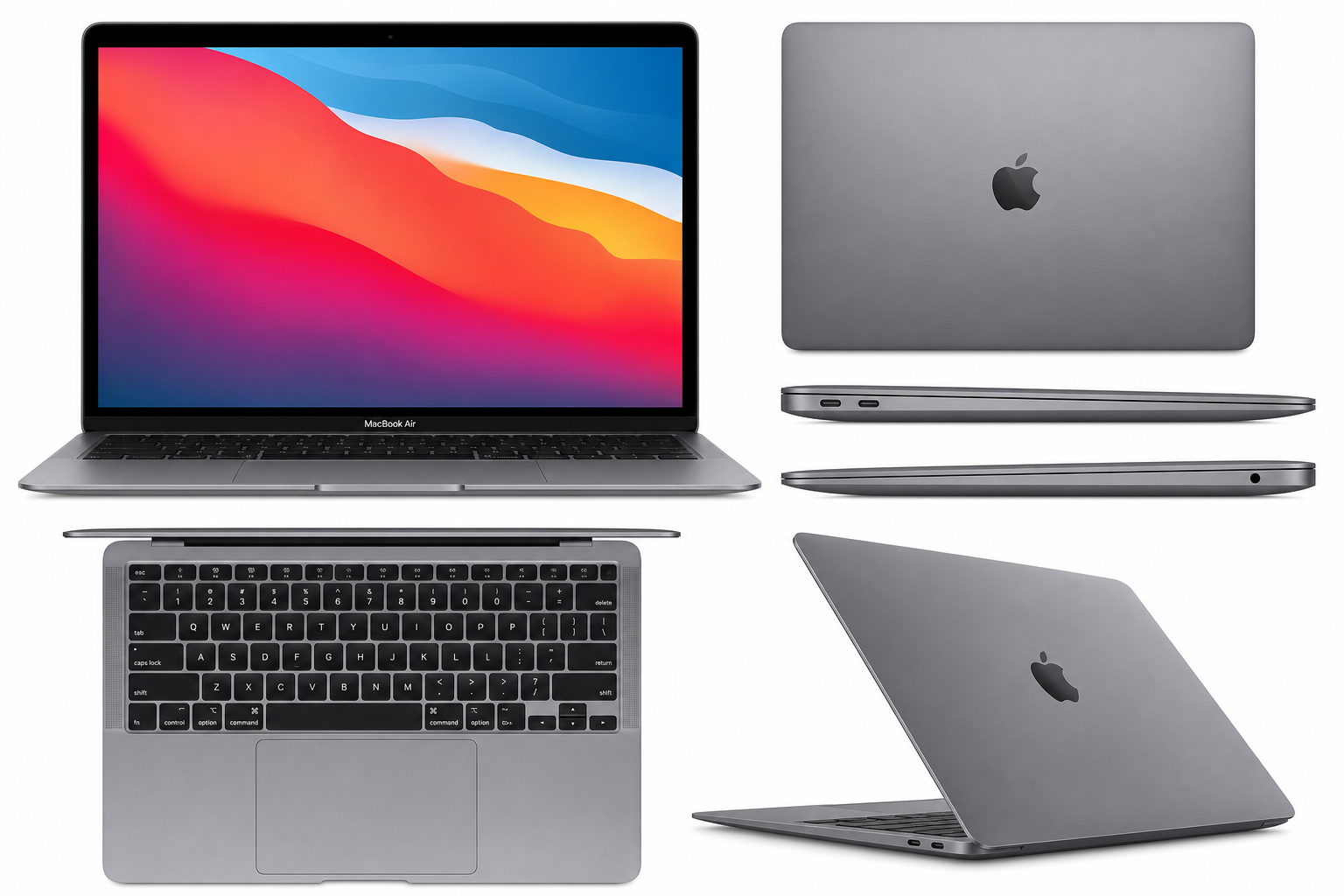
The Late 2020 Apple MacBook Air with Apple M1 Chip (13.3 inch, 8GB RAM, 128GB SSD) Space Gray (Renewed) is a refurbished version of Apple’s first-generation M1 MacBook Air. It combines a fanless design, strong day-to-day performance, and excellent battery efficiency in a thin-and-light 13.3-inch chassis.
Key hardware highlights:
- Processor: Apple M1 SoC (8‑core CPU, 7‑core or 8‑core GPU depending on batch)
- Display: 13.3-inch Retina display with True Tone, 2560 × 1600 resolution
- Memory: 8GB unified RAM
- Storage: 128GB SSD
- Graphics: Integrated Apple M1 GPU
- Ports: 2 × Thunderbolt / USB 4 (USB‑C), 1 × 3.5mm headphone jack
- Design: Fanless, wedge-shaped aluminum body in Space Gray, backlit Magic Keyboard, large Force Touch trackpad
As a renewed unit, this model has been inspected, tested, and restored to full functionality by a seller or refurbishment program, with cosmetic wear varying from barely noticeable to light surface marks depending on grading. The core appeal lies in accessing Apple’s M1 performance and macOS ecosystem at a lower cost than buying new, while accepting some compromises in storage capacity and upgradability.
Target Users
This renewed M1 MacBook Air is best suited for:
-
Students and Educators
Ideal for note-taking, research, document creation, video lectures, and light creative tasks. The long battery life, light weight, and quiet fanless design make it a strong campus companion. -
General Home and Office Users
Great for web browsing, email, Office/Google Workspace, remote meetings, and media consumption. The M1 chip provides a noticeably smoother experience than many Intel-based ultrabooks from the same era. -
Writers, Journalists, and Knowledge Workers
The comfortable keyboard, solid trackpad, and portable design suit writing, editing, and research work. macOS productivity apps and cross-device sync with iPhone/iPad add extra convenience. -
Light Creators and Hobbyists
Capable of handling light photo editing, basic video trimming, podcasting, and coding. The M1 chip supports Apple’s optimized creative apps (like Final Cut Pro and Logic Pro) at an entry level. -
Apple Ecosystem Users on a Budget
Those who want to join or remain in the Apple ecosystem—using iCloud, iMessage, AirDrop, Continuity, and Handoff—without paying for the latest MacBook models.
It is less ideal for users who need large local storage, heavy multitasking with demanding pro apps, or advanced GPU performance (3D rendering, complex video workflows, or serious gaming).
Main Benefits
1. Strong Everyday Performance from the M1 Chip
Apple’s M1 architecture delivers performance that still feels fast for typical workloads: multiple browser tabs, office apps, messaging, and light creative work. Unified memory architecture (CPU, GPU, and Neural Engine sharing the same memory pool) helps maintain responsiveness, even when switching between tasks.
2. Excellent Battery Efficiency
One of the M1 MacBook Air’s standout traits is its battery efficiency. For mixed usage (web, streaming, writing, and light productivity), many users can reasonably expect to get through a full day of work or school on a single charge, reducing reliance on power outlets when traveling or commuting.
3. High-Quality Retina Display
The 13.3-inch Retina display offers sharp text, accurate colors, and good brightness for indoor use. True Tone automatically adjusts white balance based on ambient lighting, making the screen more comfortable on the eyes during long work or study sessions.
4. Silent, Fanless Operation
The fanless design eliminates fan noise completely. Even under moderate load, the machine remains silent, which is particularly appreciated in quiet environments like libraries, classrooms, and shared workspaces.
5. Premium Build and Ergonomics
Despite being a renewed unit, the underlying hardware is still Apple’s well-known unibody aluminum design:
- Solid, flex-free chassis
- Backlit Magic Keyboard with stable keys
- Large, precise Force Touch trackpad
These factors combine to offer a premium feel that many competing refurbished laptops can’t match at similar age/spec levels.
6. Value of a Renewed Unit
A renewed MacBook offers an entry point into macOS and Apple hardware at a reduced cost versus buying new. For users comfortable with refurbished electronics and willing to trade some cosmetic perfection for savings, this model can represent strong overall value.
Key Considerations
Before choosing this specific configuration, keep the following points in mind:
1. Limited 128GB SSD
128GB of storage fills quickly once you install apps, sync photos, and download files. Because MacBook storage is not upgradeable post-purchase, planning is essential:
- Use cloud storage (iCloud, Google Drive, OneDrive) for documents and photos.
- Offload large media libraries to external SSDs or network storage.
- Regularly clean downloads and unused applications.
Users with large local media libraries (raw photos, video projects, large games) may find 128GB restrictive.
2. 8GB Unified Memory
8GB unified memory is adequate for typical productivity and light creative workflows, but more demanding users may hit limits when:
- Running many browser tabs and heavy apps simultaneously.
- Editing large, high-resolution video or complex audio projects.
- Using virtualization or containerized development environments.
For casual use and moderate multitasking, it remains sufficient; for heavy creative or development work, 16GB would be more comfortable.
3. Renewed Condition and Warranty
Because this is a renewed product, condition and coverage can vary depending on the refurbisher and region. When purchasing, review details such as:
- Cosmetic grading (e.g., “Very Good”, “Good”, etc.)
- Battery health or minimum capacity guarantee
- Warranty length and what it covers (hardware defects vs. wear-and-tear)
- Return policy and restocking conditions
Clarifying these points up front helps avoid surprises if the device arrives with minor blemishes or if issues arise later.
4. Port Selection and Accessories
With only two USB‑C/Thunderbolt ports and a headphone jack, you may need adapters or a USB‑C hub for:
- USB‑A peripherals (older flash drives, legacy accessories)
- HDMI or DisplayPort for external monitors
- Ethernet connections
Plan on additional accessories if you rely on multiple external devices or wired networking.
5. Longevity and Software Support
The Late 2020 M1 MacBook Air remains within Apple’s active support window and continues to receive macOS updates. That means several more years of security patches and feature updates, making it a relatively safe purchase from a longevity standpoint compared to much older Intel-based MacBooks.
Pros
- Efficient Apple M1 chip providing responsive performance for everyday tasks and light creative workloads.
- Excellent battery life that typically lasts a full work or school day for mixed usage.
- High-quality 13.3-inch Retina display with True Tone and sharp text for comfortable reading and content creation.
- Silent, fanless design with no fan noise, even under load.
- Premium aluminum build quality with a comfortable Magic Keyboard and large, accurate trackpad.
- Tight integration with Apple ecosystem, including iCloud, iMessage, AirDrop, Handoff, and Continuity features.
- Lighter environmental impact compared with buying a new device, thanks to refurbishment and extended product lifecycle.
- Lower cost of entry vs. new MacBooks, making macOS more accessible if you’re budget-conscious and open to refurbished hardware.
Cons
- Only 128GB SSD, which can feel limiting for users with large local files, games, or media libraries.
- 8GB RAM may be restrictive for heavy multitasking, complex creative projects, or certain development workflows.
- Renewed condition can vary, potentially including minor cosmetic blemishes depending on grading.
- Non-upgradable storage and memory, so configuration choices are permanent.
- Limited port selection (two USB‑C/Thunderbolt ports and a headphone jack), often requiring dongles or a hub.
- Integrated GPU is not aimed at high-end gaming or advanced 3D workloads, making it less suitable for power users in graphics-heavy fields.
Alternatives
If you’re evaluating the Late 2020 M1 MacBook Air (Renewed), you may also want to compare it with:
-
Renewed MacBook Air M1 with Larger SSD (256GB or 512GB)
For users who like the M1 Air but are concerned about 128GB of storage, a renewed configuration with a larger SSD can provide more breathing room for apps and files, at the expense of a higher purchase cost. -
Renewed or Used Intel-Based MacBook Pro (Pre-M1)
Some older Intel-based MacBook Pro models offer more ports, larger SSDs, or 16GB RAM at similar or slightly higher prices. However, they typically cannot match the M1 Air’s battery life and efficiency and may receive fewer years of macOS updates. -
Entry-Level New or Refurbished Windows Ultrabooks
Windows ultrabooks at similar pricing can offer:- Higher storage (256GB+)
- More varied port selection
- Better compatibility with industry-specific Windows software The trade-offs are leaving the macOS ecosystem and potentially sacrificing the M1’s efficiency and Apple-specific features.
-
Newer Apple Silicon MacBook Air (M2 or later)
If your budget stretches further, newer-generation MacBook Air models improve on performance, display brightness, webcam quality, and storage options. For users who plan to keep their laptop for many years and demand more headroom, these models may be worth the additional cost.
Conclusion
The Late 2020 Apple MacBook Air with Apple M1 Chip (13.3 inch, 8GB RAM, 128GB SSD) Space Gray (Renewed) remains a compelling option for students, home users, and professionals who prioritize portability, battery life, and macOS integration over raw storage capacity and high-end performance.
By choosing this renewed configuration, you gain access to Apple’s efficient M1 platform, a high-quality Retina display, and a premium build at a more approachable cost than buying new. In return, you accept some constraints—particularly the 128GB SSD and 8GB RAM—and the realities of owning refurbished hardware, such as potential minor cosmetic wear and varying warranty terms.
If your workflows are primarily web-based, office-focused, and light on local storage, and you value a quiet, reliable, and portable Mac, this renewed M1 MacBook Air is a strong contender. Buyers with heavier creative workloads or large local data sets, however, should consider configurations with more storage and memory—or step up to a newer-generation MacBook—for a longer-term, more flexible investment.
For those aligned with its strengths and aware of its limits, the Late 2020 Apple MacBook Air with Apple M1 Chip (13.3 inch, 8GB RAM, 128GB SSD) Space Gray (Renewed) offers one of the most balanced and accessible entry points into the modern MacBook experience.