
Lenovo Idea Tab College Tablet Review: A 2.5K 90Hz Student-Focused Android Slate with Pen and Case
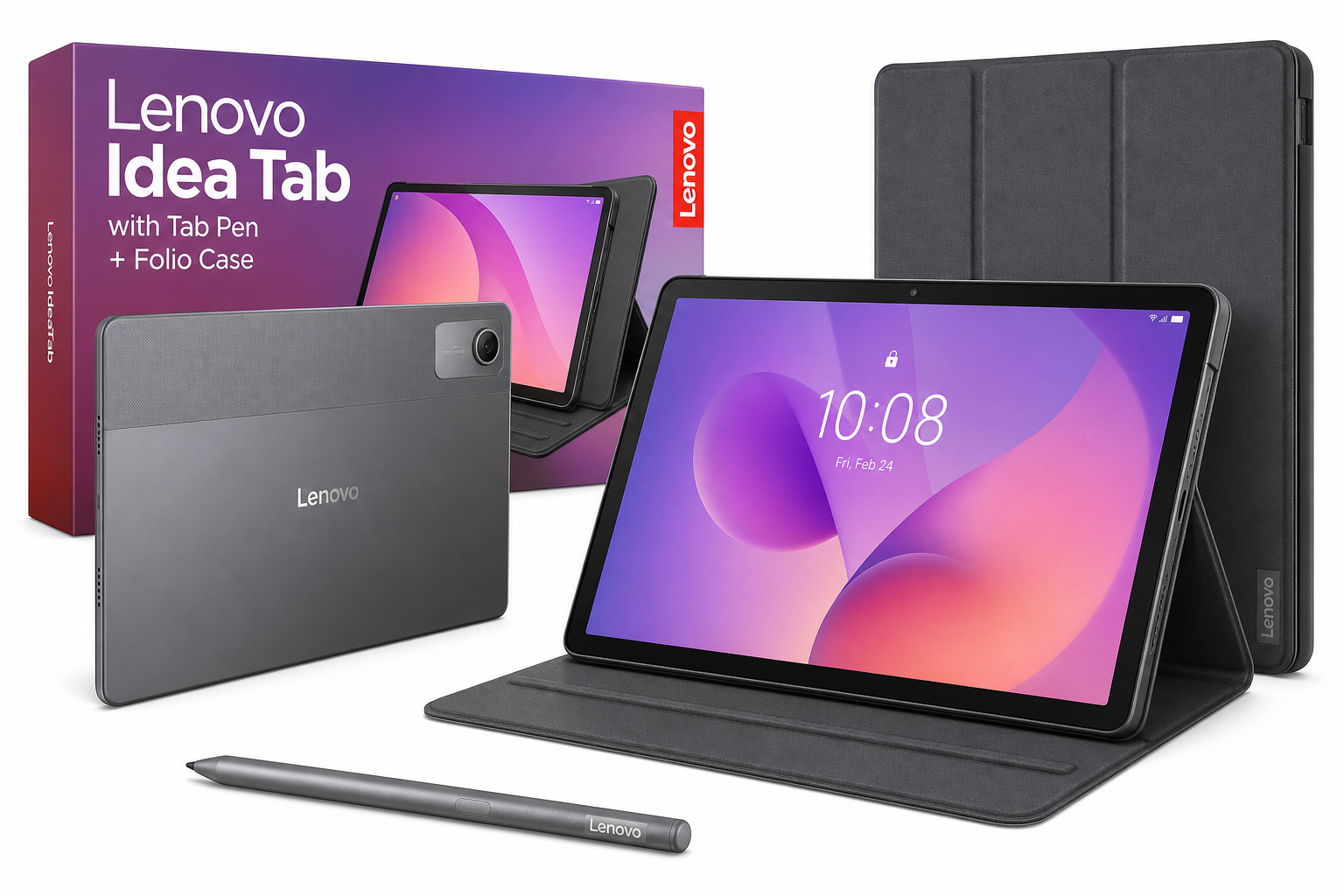
This review examines the **Lenovo Idea Tab – College Tablet – 11″ 2.5K IPS Touchscreen Display – 90Hz – MediaTek Dimensity 6300 – 4 GB Memory – 128 GB Storage – Integrated Arm Mali-G57 MC2 – Tab Pen and Folio Case** as an everyday device for students and light productivity users. We analyze its 11-inch 2.5K 90Hz display, MediaTek Dimensity 6300 performance, 4GB RAM and 128GB storage configuration, included stylus and folio case, and Android experience across common college scenarios such as note-taking, streaming, web research, and light gaming. The review highlights its high‑resolution, smooth display and included accessories as key strengths, while pointing out performance and multitasking limits tied to its 4GB of memory. A final verdict summarizes who this tablet best suits and when buyers may want to consider a higher‑spec alternative.
Introduction
The Lenovo Idea Tab – College Tablet – 11″ 2.5K IPS Touchscreen Display – 90Hz – MediaTek Dimensity 6300 – 4 GB Memory – 128 GB Storage – Integrated Arm Mali-G57 MC2 – Tab Pen and Folio Case is positioned as an affordable, student‑friendly Android tablet that still delivers a premium‑feeling screen and useful in‑box accessories. With an 11‑inch 2.5K (2560×1600) IPS panel, a 90Hz refresh rate, MediaTek Dimensity 6300 processor, and bundled Tab Pen plus folio case, it targets college and high‑school users who need a single device for note‑taking, streaming, light productivity, and casual gaming.
This configuration pairs the Dimensity 6300 SoC with 4 GB of RAM and 128 GB of internal storage, expandable via microSD, making it a lower‑memory, entry‑level variant within the Idea Tab family. The focus of this review is how well that hardware combination holds up in everyday college use, where students often multitask between reading PDFs, typing assignments, and streaming or social media.
Typical Use Cases
1. Note‑Taking and Lecture Use
A primary target for this device is classroom and lecture use. The 11‑inch 2.5K IPS display offers ample canvas for handwritten notes, diagrams, and annotating lecture slides. The included Lenovo Tab Pen and folio case are important here: you can prop up the tablet at an angle for comfortable writing or set it nearly flat for sketching and annotation.
With Android and common note‑taking apps, students can:
- Take handwritten notes directly on PDFs or slides
- Organize course notebooks by subject and semester
- Capture quick diagrams and math notation with low‑latency inking
- Use split‑screen to keep a browser or textbook open while note‑taking
2. Reading, Research, and Productivity
The 2.5K resolution and 16:10 aspect ratio make the Lenovo Idea Tab well suited to reading dense content, such as research articles or e‑textbooks. In portrait mode, the pixel density keeps text sharp; in landscape, two‑page spreads or side‑by‑side apps remain legible.
Common productivity tasks include:
- Browsing academic resources and online course platforms
- Editing documents, spreadsheets, and presentations via cloud office suites
- Marking up assignments with the pen
- Using video conferencing apps for remote lectures or study groups
3. Entertainment and Media Consumption
Off‑campus, this tablet doubles as a media device. The 11‑inch 2.5K display with 90Hz refresh rate provides smooth scrolling and visually pleasing playback for streaming platforms, social media, and web browsing. The IPS panel’s wide viewing angles are useful when watching shows with friends around a table or couch.
4. Casual Gaming and Social Apps
The MediaTek Dimensity 6300 and Arm Mali‑G57 MC2 GPU are designed for efficient, mid‑range Android performance. Paired with a 90Hz display, they enable smooth interaction in everyday apps and light‑to‑moderate games, particularly those that are well‑optimized for modern Android hardware.
This makes the Lenovo Idea Tab a reasonable choice for:
- Casual games and popular mobile titles at modest settings
- Social media apps with heavy scrolling
- Cloud‑streamed gaming via supported services (network quality permitting)
5. On‑the‑Go Study and Commuting
The included folio case gives the tablet immediate protection and stand functionality without needing an extra purchase. Combined with the relatively lightweight, slim design, that makes it practical for:
- Carrying between classes in a backpack
- Using on a small lecture desk or coffee shop table
- Taking notes on public transit by propping the tablet up in tent or stand mode
Performance in Each Scenario
Note‑Taking and Pen Input
The 11‑inch 2.5K IPS panel with a 90Hz refresh rate helps pen strokes feel responsive and visually smooth, particularly in supported note‑taking apps that can take advantage of higher refresh. The high resolution (2560×1600) means handwriting, sketches, and fine annotations remain clear without pixelation, even when zoomed in on dense documents.
The Tab Pen offers pressure‑sensitive input and palm rejection, enabling more natural writing and drawing than basic capacitive styluses. In practice, the Dimensity 6300 paired with 4 GB of RAM is generally capable of handling single note‑taking apps plus a reference document side by side; however, very large PDFs or heavy multitasking (e.g., many background apps) can induce occasional slowdowns or delayed strokes when switching rapidly between apps.
Multitasking and Productivity
For core productivity tasks, the Dimensity 6300 is an efficient mid‑range chip whose CPU cluster is designed to balance responsiveness and battery life. Day‑to‑day performance in document editing, browser‑based research, and email is typically smooth as long as the app load is moderate.
That said, 4 GB of RAM is the main constraint. Students who:
- Keep many Chrome or browser tabs open
- Run multiple office apps simultaneously
- Frequently switch between messaging, productivity, and streaming apps
may notice more frequent app reloads and slightly slower app switching compared with higher‑RAM tablets. Split‑screen with two apps (for example, a note‑taking app and a browser) is generally fine, but trying to maintain several heavy apps in memory at once can push the system to its limits.
Reading and Media Streaming
This is one of the Lenovo Idea Tab’s strongest areas. The combination of:
- 11‑inch 2.5K resolution (2560×1600)
- IPS technology for wide viewing angles
- 16:10 aspect ratio
- 90Hz refresh
makes text, images, and video appear crisp and fluid. Scrolling through long articles or PDF pages feels smoother than on standard 60Hz panels, which can reduce eye strain during extended reading sessions. The tablet’s design emphasizes comfortable hand‑held use, and the high pixel density keeps fine text detailed even at smaller font sizes.
Gaming and Graphics
The Arm Mali‑G57 MC2 GPU is competent for mainstream Android gaming but is not aimed at high‑end, intensive 3D titles at maximum quality. In casual and mid‑tier games, frame rates are generally acceptable at medium settings. The 90Hz panel provides headroom for smoother performance, but many titles will naturally target 60fps or below.
In graphically demanding games, users may need to lower graphics settings or resolution scaling for the best balance between visual fidelity and performance. Thermal management is typical for a slim tablet in this class; extended gaming sessions can warm the chassis but usually remain comfortable for hand‑held use.
Battery Life and Everyday Use
While detailed battery capacity figures vary by region, the Idea Tab line is generally tuned for a full day of mixed use that includes reading, browsing, video streaming, and note‑taking. The Dimensity 6300 SoC is built on a power‑efficient architecture, which, combined with Android’s modern power management, should allow:
- Several class periods with active note‑taking
- Additional hours of reading and light browsing
- Some evening streaming, all on a single charge in typical student usage patterns
Intensive gaming or continuous high‑brightness video streaming will shorten runtimes, as expected for any tablet.
Strengths Across Scenarios
1. High‑Quality Display for the Price Bracket
The 11‑inch 2.5K IPS panel with 90Hz refresh is a standout feature for a college‑oriented tablet. It offers:
- Sharp resolution for text‑heavy academic material
- Smooth scrolling and animation that make both studying and entertainment more enjoyable
- Wide viewing angles, helpful for collaborative work or shared video watching
2. Included Pen and Folio Case
Bundling both a Tab Pen and a folio case gives the Lenovo Idea Tab a strong out‑of‑box value proposition. Instead of purchasing a separate stylus and protective stand, students can start taking notes and propping up the tablet for lectures immediately. This also simplifies decision‑making and budgeting around accessories.
3. Student‑Friendly Design and Feature Set
The Idea Tab is clearly tailored for educational environments:
- A form factor that fits easily in backpacks and on small desks
- Pen support for digital handwriting and annotation
- A display that balances entertainment and productivity needs
- Android’s wide app ecosystem, covering textbooks, note‑taking, cloud storage, and collaboration tools
4. Solid Everyday Performance for Light Workloads
For typical student workflows—browsing, note‑taking, document editing, messaging, and streaming—the Dimensity 6300 CPU and Mali‑G57 GPU combination is well‑matched. As long as expectations align with a mid‑range tablet and multitasking remains moderate, the experience is generally fluid and reliable.
Limitations Across Scenarios
1. 4 GB RAM Constrains Heavy Multitasking
The 4 GB of memory is the main technical limitation of this particular configuration. It is sufficient for:
- One or two productivity apps plus a browser
- Single note‑taking or reading apps
- Casual, not intensive, background multitasking
However, power users or students who:
- Regularly run multiple heavy apps at once
- Keep many browser tabs open for research
- Switch rapidly between communication, productivity, and media apps
may find app reloads and slower task switching increasingly noticeable. For long‑term use over several academic years, especially as apps become more demanding, additional RAM would offer better headroom.
2. Not a High‑End Gaming Device
While the Dimensity 6300 and Mali‑G57 MC2 are capable, they do not turn the Lenovo Idea Tab into a dedicated gaming slate. Demanding 3D games will typically require reduced settings to maintain stable frame rates, and some titles may not fully leverage the 90Hz display.
Students who prioritize mobile gaming above all else, or who want console‑like performance from local Android titles, will need to temper expectations or consider more gaming‑focused hardware.
3. Limited as a Primary Laptop Replacement
The Lenovo Idea Tab can handle many laptop‑like tasks—note‑taking, document editing, email, light research—but there are inherent constraints to any tablet form factor, particularly when paired with 4 GB of RAM:
- Complex multitasking workflows (multiple office apps, heavy web apps, and communications tools all running at once) are less comfortable
- Some specialized software used in advanced courses may only be available on Windows, macOS, or Linux
Paired with a Bluetooth keyboard, the tablet can serve as a portable writing and research machine, but it is best seen as a complement to, not a full replacement for, a traditional laptop in demanding academic programs.
Verdict
The Lenovo Idea Tab – College Tablet – 11″ 2.5K IPS Touchscreen Display – 90Hz – MediaTek Dimensity 6300 – 4 GB Memory – 128 GB Storage – Integrated Arm Mali-G57 MC2 – Tab Pen and Folio Case strikes a compelling balance for its intended audience. Its strengths—an excellent 2.5K 90Hz display, bundled pen and folio case, and capable Dimensity 6300 processor—align well with the needs of students who want a single, versatile tablet for lectures, note‑taking, reading, streaming, and casual gaming.
The primary compromise is the 4 GB RAM configuration, which is adequate for light‑to‑moderate multitasking today but less ideal for users who push many apps and tabs simultaneously. Those who expect to use more demanding workflows or plan to keep the device for many years may want to look for higher‑RAM variants of the Idea Tab family when available.
For students, casual users, and parents seeking a student‑focused Android tablet with a premium‑feeling screen and ready‑to‑use accessories, this Lenovo model is an attractive option. It is best suited to:
- College and high‑school students prioritizing reading, note‑taking, and streaming
- Users who value display quality and pen support over raw processing power
- Buyers who appreciate having both a stylus and protective folio case included out of the box
If those priorities match your needs, the Lenovo Idea Tab – College Tablet – 11″ 2.5K IPS 90Hz with Tab Pen and Folio Case is a well‑rounded choice worth shortlisting in the student tablet category. You can find the exact configuration discussed here directly on Amazon at: https://www.amazon.com/dp/B0FGYCJ7NJ.