
Lenovo Idea Tab Pro with Google Gemini: A 12.7" 3K Student Tablet Built for Study and Streaming
This review looks at the **Lenovo Idea Tab Pro with Google Gemini**—a 12.7-inch 3K LCD Android tablet designed for students, with 8 GB of memory, 128 GB of storage, a MediaTek Dimensity 8300 processor, and an included stylus and folio case. We examine how its large high‑resolution display, pen support, and AI‑powered Google Gemini integration support studying, note‑taking, and media consumption, while also covering limitations such as its LCD panel versus OLED options, mid‑tier storage capacity, and Lenovo’s software and update considerations. By the end, you’ll know whether this student‑focused tablet is a strong fit for your schoolwork, reading, and streaming needs.
What This Product Is
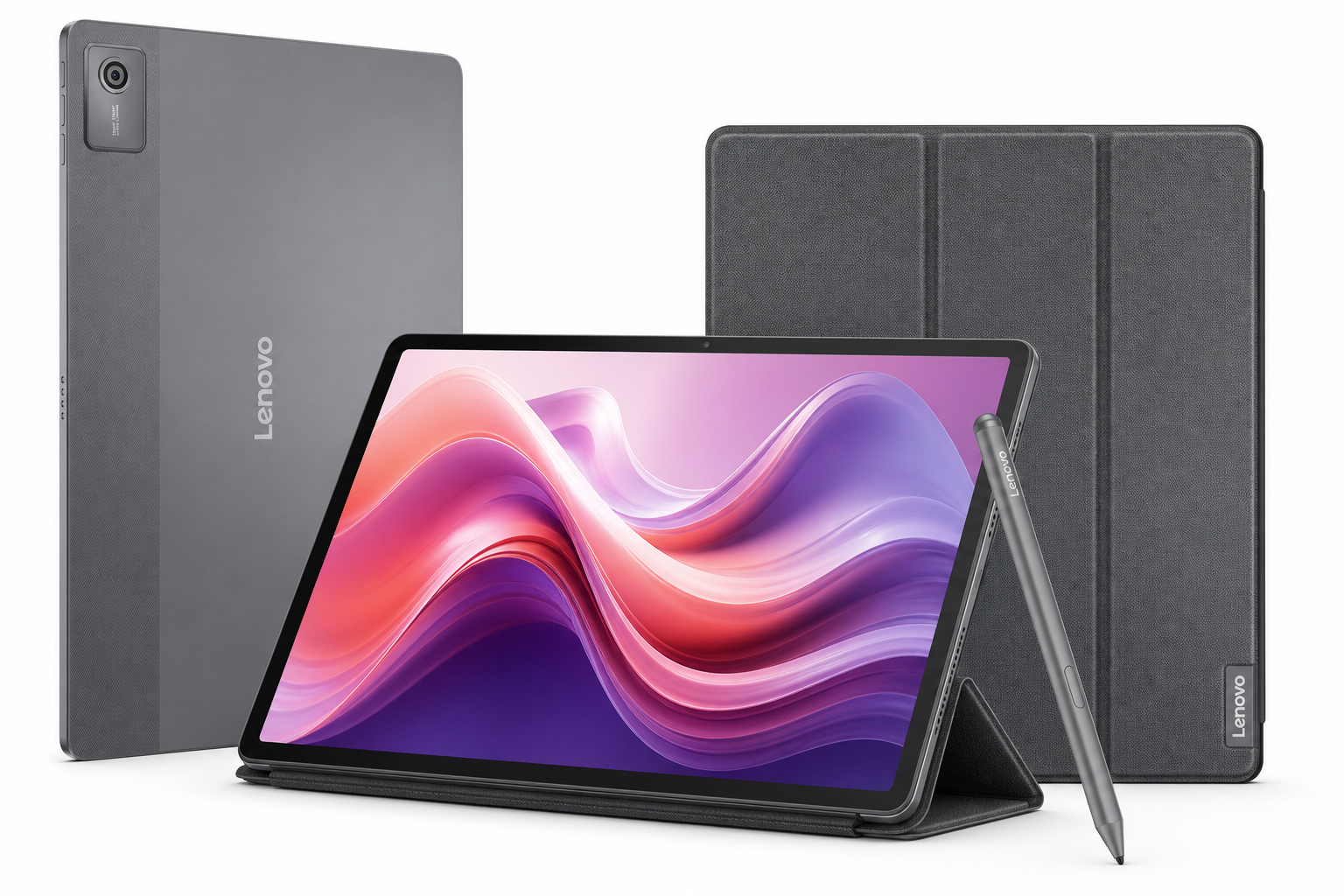
The Lenovo Idea Tab Pro with Google Gemini is a 12.7-inch Android tablet positioned as a study and productivity companion for students and everyday users. It combines a sharp 3K (2944 × 1840) LCD display, a MediaTek Dimensity 8300 processor, 8 GB of RAM, and 128 GB of internal storage in a relatively slim, lightweight chassis. The package notably includes both a pen (Lenovo Tab Pen Plus) and a folio case, so you can start handwriting notes and protecting the tablet right out of the box.
Key characteristics include:
- 12.7" 3K LTPS/IPS LCD panel with 16:10 aspect ratio, ~273 PPI, around 400 nits brightness, and low‑blue‑light/flicker‑free certifications
- MediaTek Dimensity 8300 SoC, a powerful mid‑to‑upper midrange mobile chip built for responsive multitasking and demanding apps
- 8 GB RAM for smooth app switching and multitasking
- 128 GB UFS storage, expandable via microSD on most configurations
- Lenovo Tab Pen Plus with 4096 levels of pressure sensitivity, tilt support, and palm rejection for handwriting and drawing
- Quad JBL speakers with Dolby Atmos for more immersive audio
- Integration with Google Gemini, Google’s AI assistant, to help draft, summarize, and search content more intelligently
Together, these specs make the Lenovo Idea Tab Pro a focused option for school‑oriented use: reading PDFs and textbooks, taking stylus notes, streaming lectures, and handling web‑based coursework.
Why It Matters
For students, a tablet is often more than just a media device: it can be a digital notebook, textbook library, research tool, and entertainment hub between classes. The Lenovo Idea Tab Pro with Google Gemini aims to consolidate all of that into one device that can:
- Display dense text and detailed diagrams clearly on a large, high‑resolution screen
- Capture handwritten notes accurately with a pen that’s included, not an extra purchase
- Run multiple apps at once for split‑screen study workflows (e.g., notes on one side, reading or lecture video on the other)
- Use AI assistance (Google Gemini) to help summarize readings, draft emails or essays, brainstorm ideas, and organize tasks
Compared to smaller or more budget‑oriented tablets, the Idea Tab Pro’s combination of size, resolution, and performance is tailored toward serious study sessions, not just casual browsing. Meanwhile, features like quad JBL speakers and the 3K display make it capable for late‑night shows or gaming sessions when work is done.
Key Advantages
1. Big, Sharp 12.7" 3K Display
The display is the centerpiece of this tablet. At 12.7 inches with a 3K (2944 × 1840) resolution and roughly 273 pixels per inch, it delivers a crisp, detailed image that’s well‑suited to reading PDFs, technical diagrams, and fine text.
- The 16:10 aspect ratio strikes a good balance between productivity and media consumption, giving you a bit more vertical space than 16:9 when viewing documents.
- LTPS/IPS technology provides wide viewing angles, so content remains legible when the tablet is laid flat on a desk for handwriting.
- Low blue light and flicker‑free certifications make it more comfortable for long study sessions, especially in the evening.
While it’s an LCD rather than OLED, color reproduction and clarity are strong for this class, making it a solid panel for both work and play.
2. Included Pen and Folio Case
In contrast to many competitors that charge extra for stylus and covers, the Lenovo Idea Tab Pro bundle includes:
- Lenovo Tab Pen Plus
- Up to 4096 levels of pressure sensitivity
- Tilt detection for shading and more natural strokes
- Palm rejection, so you can rest your hand on the screen without accidental touches
- Folio case
- Protects the screen during transport
- Doubles as a stand for watching videos or working at a desk
For note‑takers and students, this matters. It means the tablet arrives ready for handwriting, annotating slides, and digital planners without needing to budget for accessories. The pen performance is more than adequate for note‑taking and light illustration or diagramming.
3. Strong Performance for School and Entertainment
The MediaTek Dimensity 8300 is a capable chipset that sits comfortably in the upper midrange segment. Paired with 8 GB of RAM, it enables:
- Smooth navigation through Android and Lenovo’s UI customizations
- Comfortable multitasking with multiple apps in split‑screen or floating window modes
- Responsive performance in note‑taking apps, PDF viewers, office suites, and browsers
- The ability to handle casual to moderately demanding games without major stutters (though this is not a dedicated gaming tablet)
For typical student workloads—dozens of browser tabs, video streaming, collaborative documents, and note‑taking—this configuration offers more than enough headroom.
4. Google Gemini and Modern Android Features
A headline feature is the integration with Google Gemini, Google’s AI assistant. On a tablet meant for students, that has concrete benefits:
- Summarize long readings or lecture transcripts
- Draft outlines, emails, and reports more quickly
- Help brainstorm project ideas or research directions
- Assist with language and grammar suggestions while writing
Combined with modern Android (Android 14 in many Idea Tab Pro configurations), you also get updated multitasking features, improved privacy controls, and compatibility with a wide range of education apps from the Play Store.
5. Quad JBL Speakers with Dolby Atmos
Audio quality is above average for this price class thanks to four JBL‑tuned speakers with Dolby Atmos support. For students who watch a lot of lectures, YouTube tutorials, or recorded classes, clearer sound can make a real difference in comprehension.
The speaker setup also enhances movies, shows, and casual gaming, making the tablet a well‑rounded home entertainment device.
6. Balanced Portability for a Large Tablet
Despite the 12.7-inch screen, the Lenovo Idea Tab Pro remains relatively slim and portable:
- Thin profile and modest weight for its size, making it manageable to carry in a backpack
- The included folio case provides protection for commuting between home, campus, and libraries
While not as compact as an 8–10" tablet, the extra screen real estate pays off significantly when reading, annotating, and multitasking.
Key Limitations
1. LCD vs OLED
The 3K LCD display is sharp and bright enough for most use cases, but it’s still an LCD panel, not OLED. This brings a few trade‑offs:
- Blacks are more dark‑gray than inky black, especially noticeable in dim rooms or when watching movies with letterboxing
- Contrast and perceived depth are lower compared with OLED competitors
- Users coming from high‑end OLED phones or tablets may find the screen less “punchy”
For productivity and study, these differences are minor. However, content‑consumption enthusiasts who prize the absolute best contrast may prefer an OLED‑equipped device, often at a higher cost.
2. 128 GB Storage May Be Limiting for Heavy Users
The 128 GB storage tier is adequate for many students, especially with cloud storage usage. But:
- Large offline libraries of textbooks, downloaded videos, and high‑resolution lecture recordings can add up
- Users who install many large games or keep extensive offline media may need more space
If you fall into those heavier categories, you’ll likely want to rely on microSD expansion (where available) or more aggressively manage your local storage.
3. Lenovo Software and Update Policy
Lenovo’s Android skin is relatively light but does introduce:
- Additional pre‑installed apps that some users may consider bloatware
- A software‑update cadence that can be less predictable than Google’s or some premium competitors’ tablet lines
For most students, this won’t be a deal‑breaker, but those who prioritize ultra‑fast OS updates and the cleanest possible Android experience might prefer a more stock‑Android‑oriented tablet.
4. Not a Full Laptop Replacement by Itself
The Lenovo Idea Tab Pro with folio case is excellent for content consumption and light productivity, but it’s not, by default, a full laptop replacement:
- The included folio case is protective and provides a stand, but it’s not a keyboard case
- For heavy writing, spreadsheet work, or coding, you’ll likely want to pair it with a Bluetooth keyboard and mouse
Students who need a full desktop‑class workflow for specialized software might still require a traditional laptop in addition to the tablet.
Who It’s For
The Lenovo Idea Tab Pro with Google Gemini is best suited for:
-
High school and college students
- Reading and annotating PDFs, textbooks, and research articles
- Taking handwritten notes in class with the included pen
- Watching recorded lectures, participation in online courses, and collaborating on group projects
-
Note‑takers and digital planner users
- Those who prefer a paper‑like handwriting workflow but want searchability, backups, and cross‑device access
- Users who rely on apps like OneNote, Google Keep, Evernote, or dedicated planner apps
-
Casual creators and hobby artists
- Sketching diagrams, concept art, or visual notes
- Using the pressure‑sensitive, tilt‑aware pen for light art and design work
-
Media‑first users who still value productivity
- Anyone who wants a large, sharp display and good speakers for streaming video, reading, and browsing, while still having enough power for work tasks
-
AI‑curious learners
- Students and self‑learners interested in using Google Gemini to aid research, drafting, summarizing, and organization on a portable device.
Who Should Skip It
You may want to look elsewhere if:
-
You demand OLED‑level contrast and deep blacks
- If your top priority is the richest possible video experience and you’re sensitive to LCD’s limitations in dark scenes, an OLED‑equipped tablet may be a better match.
-
You need a true laptop replacement with heavy keyboard use
- While the Idea Tab Pro can pair with external keyboards, users who spend hours each day in coding environments, advanced spreadsheets, or desktop‑grade apps may still be better off with a Chromebook or laptop.
-
You require very large local storage
- If you intend to store large libraries of offline 4K videos, AAA Android games, or expansive project files and don’t want to manage external storage or the cloud, 128 GB may feel constraining.
-
You want the cleanest, fastest‑updated Android experience
- Users who strongly favor stock Android and long, clearly defined update timelines might prefer a tablet from brands that promise more aggressive OS and security update schedules.
Final Recommendation
The Lenovo Idea Tab Pro with Google Gemini – Student Tablet – 12.7” 3K LCD Display – 8 GB Memory – 128 GB Storage – MediaTek Dimensity 8300 – Includes Pen and Folio Case is a well‑rounded, student‑focused Android tablet that stands out for its combination of a large, sharp display, integrated pen support, solid performance, and AI‑enhanced productivity features.
For students and note‑takers who want a big digital canvas for reading, writing, and multitasking—and who appreciate having the pen and folio case included—the Idea Tab Pro is a compelling option. Its limitations (LCD instead of OLED, modest 128 GB storage, and typical Lenovo software quirks) are worth weighing, but for schoolwork, reading, and everyday entertainment, it delivers a strong mix of usability, performance, and value.
If you’re looking for a single device that can handle classes, assignments, and downtime streaming with equal confidence, the Lenovo Idea Tab Pro with Google Gemini deserves a spot on your shortlist.