
Samsung Galaxy Tab A11+ (2026) Review: A Balanced 11‑Inch Android 16 Tablet for Everyday Use
This review of the Samsung Galaxy Tab A11+ Plus 2026 (SM‑X230) 128GB Wi‑Fi model examines its 11‑inch 90Hz display, Android 16 software support, 4nm octa‑core processor, quad speakers, and all‑day battery life. It highlights the tablet’s strengths for streaming, light productivity, and casual gaming, while noting trade‑offs such as its TFT LCD panel, basic cameras, and lack of S Pen support. The article also discusses the implications of buying an international model, including software updates and warranty considerations, to help readers decide if this balanced mid‑range tablet fits their needs.
Introduction
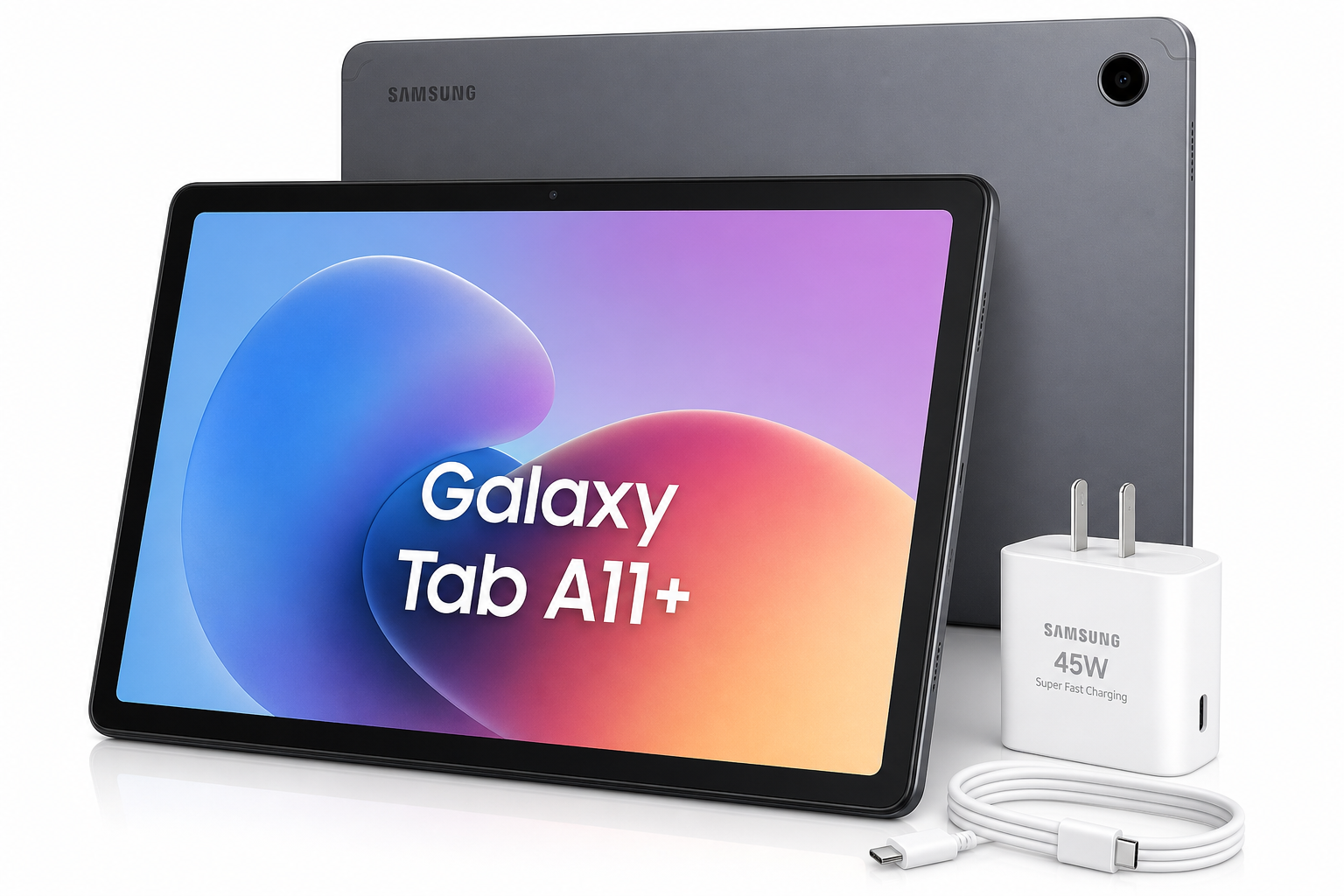
The Samsung Galaxy Tab A11+ Plus 2026 (128GB, 6GB, Wi‑Fi Only) 11.0" Android 16 Tablet targets users who want a modern, capable Android tablet without stepping up to Samsung’s premium S‑series. With an 11‑inch 90Hz display, 4nm octa‑core processor, Android 16 out of the box, and quad speakers, it aims to handle media consumption, schoolwork, and everyday multitasking at home.
This particular configuration is the SM‑X230 international Wi‑Fi model bundled with a fast‑charge power cube. Below, we break down its hardware, software experience, and real‑world performance to help you determine whether it’s the right fit.
Product overview and key features
Design and build
The Galaxy Tab A11+ follows Samsung’s current tablet design language:
- Slim, lightweight chassis around 6.9 mm thick and roughly 477 g, making it comfortable to hold for extended reading or streaming sessions.
- Metal‑like finish in Gray, giving it a more premium feel compared to entry‑level plastic tablets.
- Narrow bezels around the display that keep the footprint compact while leaving enough room for a comfortable grip in landscape.
The international SM‑X230 model is Wi‑Fi only, so there’s no cellular modem, SIM tray, or 5G support to consider.
Display
One of the main selling points is the 11.0‑inch WUXGA (1920 × 1200) TFT LCD with a 90Hz refresh rate:
- Resolution and size: 11 inches at 1920 × 1200 gives a sharp enough pixel density for reading, browsing, and media playback.
- 90Hz refresh rate: Scrolling and animations look noticeably smoother than on 60Hz budget tablets, making the UI feel more responsive.
- Aspect ratio is well‑suited for streaming video in landscape while still being comfortable for web pages and documents in portrait.
The use of a TFT LCD instead of OLED means blacks aren’t as deep and colors are less punchy than on Samsung’s higher‑end S‑series. However, brightness and clarity are sufficient for indoor use and moderate ambient light.
Processor, memory, and storage
At the core of this model is an octa‑core MediaTek Dimensity 7300 (4nm) paired with 6GB of RAM and 128GB of internal storage:
- The 4nm process and modern architecture offer good efficiency and thermal control for a mid‑range tablet.
- 6GB RAM is adequate for multitasking typical tablet workloads: several browser tabs, streaming apps, email, and note‑taking without frequent app reloads.
- 128GB internal storage provides a solid baseline for apps, offline media, and games.
- Storage is expandable via microSD (up to 2TB), which is useful if you store large media libraries or download lots of content for offline viewing.
This combination puts the A11+ comfortably above many entry‑level tablets in both CPU and GPU performance, especially when paired with Android 16’s optimizations.
Software: Android 16 and One UI
The Tab A11+ ships with Android 16 and One UI 8 / 8.5, giving it a modern software foundation:
- Updated interface with refreshed visuals, improved widgets, and better integration between phone and tablet if you already use a Samsung Galaxy phone.
- Samsung DeX (standalone) support allows a more desktop‑like interface when you connect a keyboard or use a stand, making document editing and multitasking more efficient.
- Long‑term security updates are a focus for this generation, making it more viable as a multi‑year device for families and students.
As an international model (X230), system software is the same core Samsung build, but regional apps, default languages, and available services may differ slightly from US‑specific models.
Audio and cameras
For media, the tablet includes four stereo speakers with support for Dolby Atmos:
- The quad‑speaker layout gives better stereo separation than dual‑speaker tablets, especially in landscape.
- Dolby Atmos processing adds more perceived depth for movies, TV shows, and games.
Camera hardware is modest but serviceable:
- Rear camera: 8 MP with autofocus for document snapshots, quick photos, and video.
- Front camera: 5 MP, oriented for video calls and online classes.
- Full HD (1080p) video recording is supported, sufficient for meetings and casual capture.
Image quality is in line with typical mid‑range tablets—good enough for conferencing and occasional photos, but not a replacement for a smartphone camera.
Connectivity and battery
The A11+ Wi‑Fi model provides:
- Dual‑band Wi‑Fi (2.4/5 GHz) with support for modern 802.11 standards.
- Bluetooth 5.1 for wireless headphones, keyboards, and game controllers.
- USB‑C port (USB 2.0) for charging and data sync.
Powering everything is a 7,040 mAh battery with fast charging support (bundle includes a fast charge cube):
- The capacity is well‑matched to the 11‑inch screen and 4nm chipset, targeting all‑day mixed use on a single charge for streaming, browsing, and productivity.
- Fast charging reduces downtime, so topping up before a class or commute is more practical.
Notably, this tablet does not support S Pen input and does not include a stylus in the box, which may matter if you are specifically looking for advanced handwriting or drawing capabilities.
Performance and user experience
Everyday performance
With its Dimensity 7300 and 6GB RAM, the Tab A11+ handles everyday tasks smoothly:
- UI navigation feels responsive, aided by the 90Hz display.
- Web browsing and social apps run without major slowdowns, even with several tabs or apps open.
- Video streaming from platforms like YouTube or other services is smooth at high resolutions.
You may occasionally see small hiccups when rapidly switching between many heavy apps or large browser sessions, but for the typical home or school workload, performance is comfortably above basic budget tablets.
Gaming and graphics
The tablet’s GPU and high refresh rate make it a capable casual gaming device:
- Popular casual and mid‑tier 3D games run well at medium to high settings.
- Competitive titles that benefit from 90Hz displays feel more fluid than on 60Hz tablets, though not all games support higher refresh rates.
- Sustained performance is good enough for longer gaming sessions, with the 4nm process helping keep temperatures in check.
For graphics‑intensive AAA‑style mobile games at maxed settings, you may need to adjust visual quality to maintain consistently high frame rates.
Multimedia and content consumption
The A11+ is particularly strong as a media consumption tablet:
- The 11‑inch display gives a comfortable movie‑like experience, especially in landscape.
- Quad speakers with Dolby Atmos offer fuller, louder sound than most budget competitors, which is ideal for watching videos without headphones.
- The wide screen is also suitable for reading comics, magazines, and news apps.
Colors and contrast are good for an LCD panel, though if you are used to OLED tablets you will notice less depth in blacks and HDR content.
Productivity and multitasking
Samsung’s software adds useful tools for productivity:
- Split‑screen and multi‑window modes let you run multiple apps side by side, such as a browser and note‑taking app.
- Samsung DeX provides a desktop‑like environment with a taskbar and resizable windows when you connect a keyboard, enhancing document editing and email.
- Bluetooth keyboards and mice connect easily, turning the A11+ into a lightweight laptop alternative for light work.
The lack of S Pen support limits its appeal for intensive digital artists or heavy handwritten note‑takers, but for typing‑centric tasks and general multitasking, it performs well.
Software support and international model considerations
As an international SM‑X230 model, there are a few practical considerations:
- Warranty: These units typically rely on the seller’s return or limited warranty rather than an official US Samsung warranty. Support and service policies may differ from region‑locked US models.
- Software updates: System updates are delivered directly from Samsung, often on a similar schedule to other global variants. You can expect periodic security patches and feature updates over several years.
- Regional features: Some preinstalled apps and region‑specific services may differ from US‑only configurations, but core Google and Samsung services remain available.
For most users, the day‑to‑day experience is essentially that of any other Galaxy Tab A11+ Wi‑Fi device, with the main trade‑off being warranty handling.
Pros and cons
Pros
- Modern 11‑inch 1920 × 1200 display with 90Hz refresh rate for smooth UI and scrolling.
- 4nm MediaTek Dimensity 7300 octa‑core chipset delivers solid everyday and casual gaming performance.
- 6GB RAM and 128GB storage, plus microSD expansion up to 2TB, provide good headroom for apps and media.
- Android 16 with One UI and support for Samsung DeX, improving multitasking and light productivity.
- Quad speakers with Dolby Atmos offer above‑average sound quality for media.
- 7,040 mAh battery supports extended, all‑day use under mixed workloads.
- Slim, lightweight design with a modern, premium look in Gray.
- Fast‑charge cube bundle means you don’t need to purchase a separate charger.
Cons
- TFT LCD panel lacks the deep blacks and vivid contrast of OLED displays.
- No S Pen support, limiting advanced note‑taking and drawing capabilities.
- Cameras (8 MP rear / 5 MP front) are basic and intended mainly for video calls and quick snapshots.
- Wi‑Fi only on this SM‑X230 variant—no LTE or 5G for on‑the‑go connectivity without tethering.
- As an international model, warranty and support may depend primarily on the seller rather than local Samsung service centers.
Conclusion and recommendation
The Samsung Galaxy Tab A11+ Plus 2026 (128GB, 6GB, Wi‑Fi Only, SM‑X230) sits in a strong position in the mid‑range Android tablet market. It delivers a compelling mix of features—an 11‑inch 90Hz screen, capable 4nm octa‑core processor, quad speakers, and Android 16 with DeX—making it well‑suited as a home media hub, study companion, or general‑purpose family tablet.
If your priorities include smooth performance for streaming, browsing, schoolwork, and casual gaming, and you don’t need S Pen functionality or built‑in cellular data, this tablet is a very balanced choice. The international nature of this specific model does mean you should pay attention to warranty and return policies from your chosen retailer, but in terms of everyday experience, it performs on par with Samsung’s global A11+ Wi‑Fi lineup.
For users seeking a reliable, up‑to‑date 11‑inch Android tablet that emphasizes smooth UI, strong multimedia capabilities, and versatile multitasking, the Samsung Galaxy Tab A11+ Plus 2026 X230 Wi‑Fi model is an option well worth considering.