
Samsung Galaxy Tab S10 Lite Review: A Balanced Android Tablet With S Pen and Galaxy AI
This review examines the **[Samsung Galaxy Tab S10 Lite](https://www.amazon.com/dp/B0FF5JJ3CP)**, a 10.9‑inch Android tablet featuring 6GB of RAM, 128GB of internal storage with up to 2TB expansion, an Exynos 1380 processor, S Pen support for note‑taking, and Galaxy AI features like Circle to Search. We evaluate its design, standout features, software experience, performance, battery life, and everyday usability. The article also outlines who this tablet best suits, along with clear pros and cons to help buyers decide whether the Galaxy Tab S10 Lite is the right fit for work, study, and entertainment.
Overview
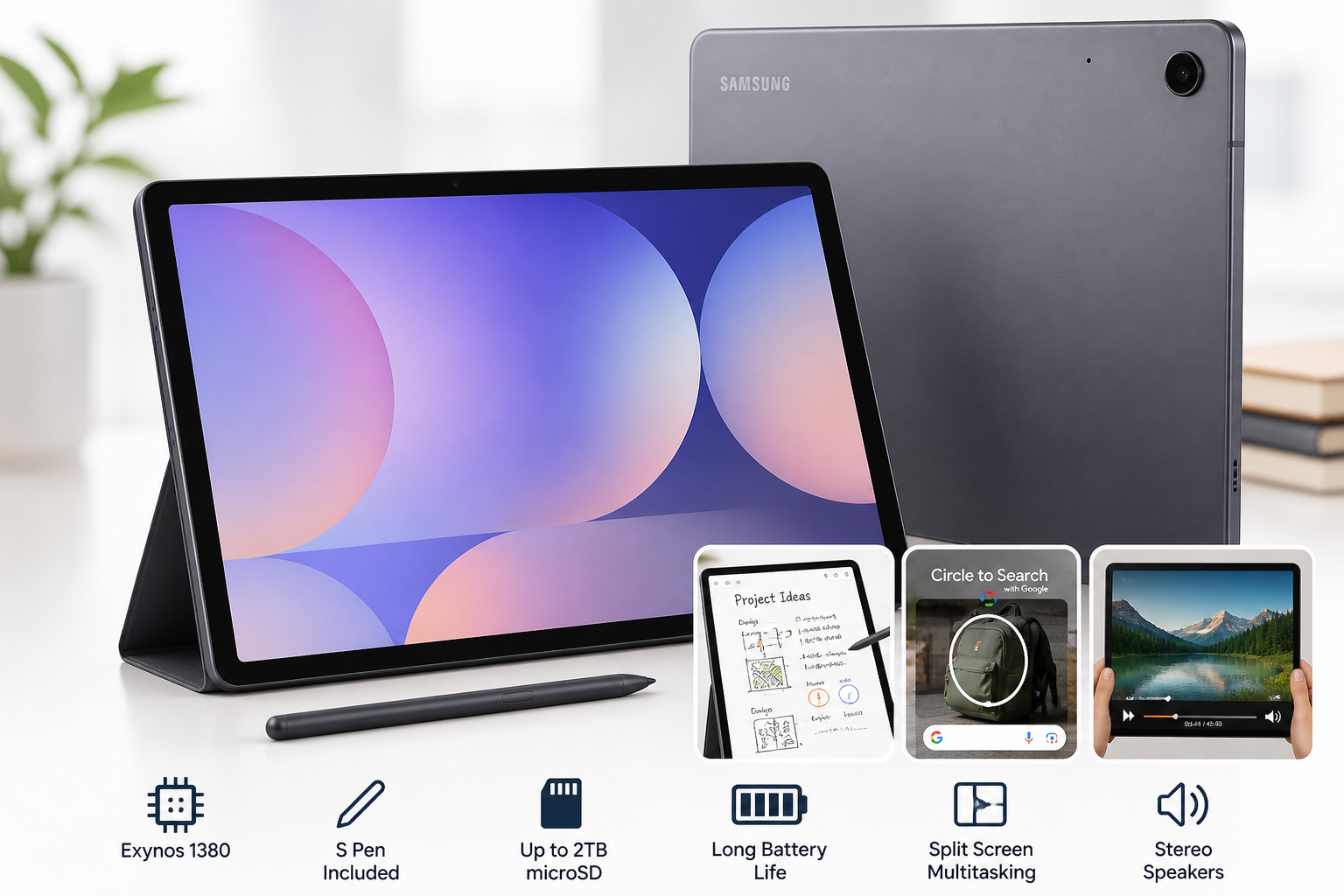
The Samsung Galaxy Tab S10 Lite is positioned as a mid‑range Android tablet that blends productivity and entertainment. With a 10.9‑inch LCD display, 6GB of RAM, 128GB of internal storage, and support for microSD expansion up to 2TB, it aims to offer enough headroom for multitasking and media without stepping into premium pricing territory.
Powered by Samsung's Exynos 1380 chipset, the Tab S10 Lite brings respectable performance for everyday tasks, light creative work, and casual gaming. A key selling point is the included S Pen, designed for note‑taking, sketching, and precise navigation. Samsung also integrates Galaxy AI tools and Circle to Search, leveraging AI to enhance search and productivity in supported apps.
The tablet's long battery life and relatively lightweight design make it appealing for students, professionals, and home users seeking a versatile device for browsing, streaming, reading, and work on the go.
Standout Features
10.9‑Inch LCD Display
- Size and aspect ratio: The 10.9‑inch panel offers a comfortable balance between portability and workspace, making split‑screen multitasking and document work practical.
- LCD technology: While not AMOLED, the LCD display should deliver solid brightness, crisp text, and good color reproduction for web, video, and productivity.
- Ideal for media and reading: The screen size is well‑suited to streaming, e‑books, PDFs, and browsing, which are typical use cases in this class.
S Pen for Note‑Taking and Creativity
- In‑box stylus: The presence of an S Pen significantly boosts the value proposition, eliminating the need for a separate stylus purchase.
- Low‑latency writing: Samsung’s S Pen ecosystem is known for responsive inking, making handwriting, annotations, and sketching feel natural.
- Integrated software: Samsung Notes, screen annotation tools, and handwriting‑to‑text support enable efficient digital note‑taking for students and professionals.
Exynos 1380 Processor
- Mid‑range 5nm/6nm‑class SoC (Samsung Exynos 1380) that targets efficient performance for daily use.
- Balanced CPU/GPU: Designed to handle multitasking, productivity apps, and casual gaming with reasonable smoothness for this segment.
- AI acceleration: Supports Galaxy AI features and on‑device processing for certain tasks, improving responsiveness while reducing reliance on cloud operations where possible.
Galaxy AI Tools and Circle to Search
- Circle to Search: Allows users to circle items on the screen to quickly search for related information or products, streamlining research and comparison tasks.
- Galaxy AI tools: May include features such as AI‑assisted note summaries, translation, and context‑aware suggestions in select apps (availability can vary by region and software version).
- Productivity edge: These AI additions differentiate the Tab S10 Lite from older Samsung tablets that lack integrated AI experiences.
Generous Storage Options and Expandability
- 6GB RAM: Provides adequate headroom for multitasking across browser tabs, productivity apps, and light creative workloads.
- 128GB internal storage: A practical baseline for apps, documents, and offline media.
- Up to 2TB microSD expansion: Particularly valuable for storing large offline video libraries, course materials, or project files without relying solely on cloud storage.
Long Battery Life
- All‑day use focus: The battery is tuned to support extended browsing, streaming, and note‑taking without frequent recharges.
- Efficiency from Exynos 1380: The SoC’s efficiency‑oriented design helps sustain longer screen‑on time in typical workloads.
Supporting Features
Beyond its headline capabilities, the Samsung Galaxy Tab S10 Lite includes a set of supporting features that round out the experience:
- Android with One UI: Samsung’s One UI skin adds multitasking enhancements (split screen, pop‑up view), S Pen‑specific utilities, and integration with Samsung’s broader ecosystem.
- Stereo speakers (configuration varies by model) tuned for media consumption, improving immersion for movies and shows compared with single‑speaker tablets.
- Camera setup suitable for video calls, document scanning, and casual photos. While not a camera‑centric device, it is sufficient for remote meetings and coursework.
- Samsung ecosystem integration: Features like Samsung Cloud, Quick Share, and possible continuity functions with Galaxy phones and laptops enhance workflows for users already invested in Samsung devices.
- Gray color finish: A neutral, professional look that fits both office and home environments.
Usability
Design and Build
The Tab S10 Lite adopts a slim, modern design with relatively thin bezels and a flat display. The gray finish and understated styling make it suitable for business meetings, classrooms, or home use. Its weight and thickness are tuned for comfortable hand‑held use while reading or watching video for extended periods.
Everyday Experience
- Setup and configuration: Initial setup follows the standard Android onboarding process, with Samsung’s additional options for account integration and data migration from previous devices.
- S Pen workflow: The inclusion of the S Pen improves navigation and input accuracy. For students, annotating lecture slides or PDFs becomes straightforward; professionals can mark up documents, sign PDFs, or take meeting notes quickly.
- Software environment: One UI is feature‑rich but may feel more layered than stock Android. However, its tablet‑focused enhancements—such as improved split‑screen controls and a taskbar‑like interface (depending on software version)—are beneficial for productivity.
- Portability: The 10.9‑inch size makes the tablet easy to slip into a backpack or briefcase. It’s compact enough for travel, commuting, and couch use while still offering significantly more screen real estate than large phones.
Accessories and Expandability
- Cases and keyboards: While not always bundled, compatible folio covers and Bluetooth or keyboard‑case options can turn the Tab S10 Lite into a light productivity workstation.
- Storage expansion: The microSD slot simplifies managing large data sets—especially helpful for offline learners, field workers, and users with extensive media collections.
Performance
Day‑to‑Day Performance
With 6GB of RAM and the Exynos 1380 processor, the Tab S10 Lite is built to handle core tasks smoothly:
- Web browsing with multiple tabs, email, and office apps runs comfortably.
- Video streaming from major services should be fluid, with adequate resolution and stable playback.
- Note‑taking and PDF markup with S Pen remain responsive, even in larger documents, assuming moderate multitasking.
Users coming from older entry‑level tablets will likely notice clear gains in responsiveness and multitasking capability.
Multitasking and Productivity
- Split‑screen usage: Running two apps side by side—such as a browser and a note app, or video lecture and PDF—works well thanks to the combination of RAM, display size, and One UI’s multitasking tools.
- Office and collaboration apps: Word processors, spreadsheets, presentation tools, and conferencing apps like Zoom or Teams should work reliably for meetings and remote learning.
Gaming and Graphics
- Casual and mid‑tier games: Titles with moderate graphics requirements should run smoothly at sensible settings.
- High‑end games: Demanding 3D games may require reduced graphics settings or may not sustain peak frame rates for long sessions, which is typical in this mid‑range segment.
Battery and Charging
- All‑day battery: Under mixed usage (web, streaming, emails, note‑taking), the tablet is designed to last through a work or school day without requiring a charge.
- Charging behavior: Charging speeds will depend on the supported wattage and the adapter used. It is optimized for practicality rather than headline‑grabbing fast‑charge specs.
Pros and Cons
Pros
- 10.9‑inch LCD provides a comfortable balance of size and portability for media and productivity.
- Included S Pen enables precise note‑taking, drawing, and navigation without extra cost.
- Exynos 1380 offers solid mid‑range performance for everyday tasks and light creative work.
- Galaxy AI tools and Circle to Search bring modern AI‑enabled experiences to a tablet form factor.
- 6GB RAM + 128GB storage, with microSD expansion up to 2TB, offer good multitasking and storage flexibility.
- Long battery life supports full‑day use for study or work.
- Samsung ecosystem integration enhances value for users with other Galaxy devices.
Cons
- LCD instead of AMOLED may disappoint users accustomed to deeper blacks and higher contrast.
- Mid‑range chipset is not ideal for heavy 3D gaming or intensive professional workloads.
- One UI can feel more complex than stock Android for minimalists.
- Keyboard and some accessories may require separate purchase, adding to total system cost.
Summary
The Samsung Galaxy Tab S10 Lite, 6GB RAM, 128GB, 2TB Expand, 10.9” LCD, Gray | Long Battery Life, S Pen for Note‑Taking, Exynos 1380, Circle to Search, AI Tools is a well‑rounded mid‑range Android tablet that prioritizes practicality and productivity.
Its combination of 10.9‑inch display, S Pen support, solid Exynos 1380 performance, and robust storage expansion makes it particularly suitable for students, remote workers, and everyday users who need a reliable, portable device for reading, note‑taking, streaming, and light multitasking.
While it doesn’t aim to compete with premium tablets on display technology or high‑end gaming power, it delivers a compelling mix of usability, battery life, and AI‑enhanced features at this level. If you are seeking a versatile Android tablet that can comfortably handle day‑to‑day tasks and leverage Samsung’s S Pen and Galaxy AI ecosystem, the Samsung Galaxy Tab S10 Lite deserves serious consideration.